Immersive Security Overview
- Undefined type
This document shows how Immersive security works from the perspective of a customer, security manager, or platform administrator.
He explains:
- how users and organizations are isolated;
- how access is granted or prohibited;
- what administrative roles exist;
- how automatic rights and shares work;
- how consistency and traceability are ensured.
Information for developers and integrators is grouped in Web Front, API, and Security Tools.
General principles
Immersive security is based on a few simple principles:
- Any user is identified before accessing a protected resource;
- Users are attached to an organization.
- Access can be granted directly or through groups.
- an explicit prohibition takes precedence over an authorisation;
- in the absence of authorisation, access is denied;
- Administrative rights and business rights are separated.
- Security changes are persistent and shared across different instances of the server.
- Sensitive transactions are traceable.
Reading the conceptual model
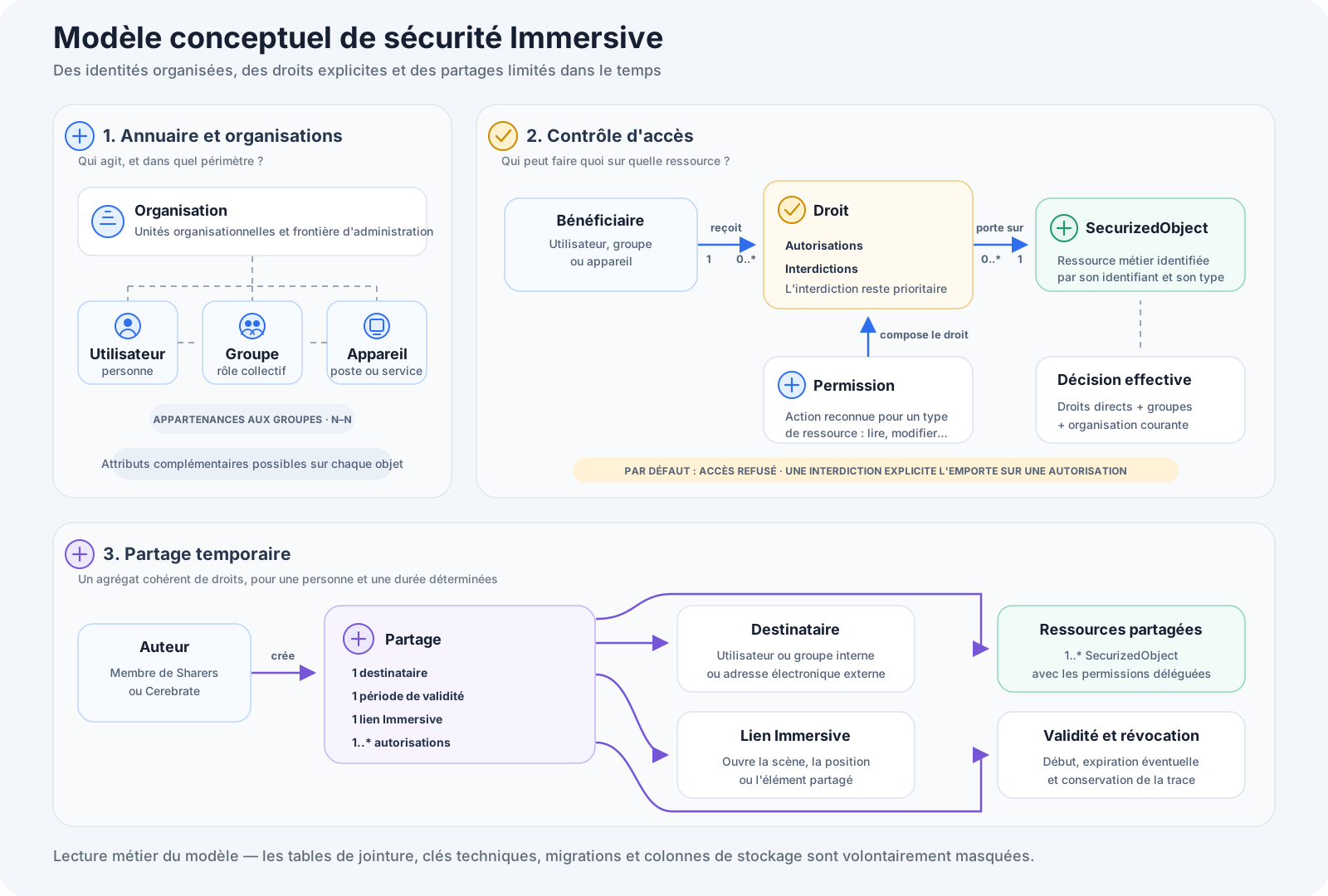
The model is read in three sets:
- The directory defines the actors — users, groups, and devices — as well as their organization and memberships.
- Access control links a beneficiary to a
SecurizedObjectby means of a right. Permissions give the vocabulary of actions that can be allowed or prohibited. - Temporary sharing groups multiple permissions around a recipient, a validity period, and an Immersive link.
The schema is intentionally conceptual. Join tables, technical keys, migration information, and storage details do not appear in the schema—they materialize the model but are not additional business actors.
Identities and security directory
Immersive uses a structured security directory. It contains:
| Element | Function |
|---|---|
| User | Represents a person who can authenticate and use Immersive |
| Group | Brings together multiple users, devices, or other groups to apply the same rights to them |
| Organizational unit | Organizes accounts and groups, including by client organization |
| Device | Represents an automated position, program, or process |
A user can belong to more than one group. Groups can also be nested: a right assigned to a parent group benefits the members of its subgroups.
Accounts, memberships and rights are permanently preserved. They are not dependent on the session opened in the browser.
Separation of organizations
Each organization has its own area of administration. In particular, it has:
- its users;
- its groups;
- its apparatus;
- its administrators;
- Its users are allowed to create shares.
The current organization determines the scope within which the user views the data and performs operations. An organization cannot administer users, groups, or resources in another organization.
The change of organization does not create a new identity: it changes the user's work context while maintaining his or her rights specific to each organization.
Users and Primary Roles
Cerebrate
The account Cerebrate is the platform's overall recovery and monitoring account.
It can intervene on all organizations and resources without having to receive each right individually. Its use must remain reserved for exceptional installation, recovery and global administration operations.
Platform administrators
Platform administrators can manage common installation items, create or administer organizations, and intervene in the overall configuration according to their assigned responsibilities.
Administrators of an organization
Administrators of an organization manage their own scope:
- users and groups in the organization;
- group memberships;
- Secure resources of the organization;
- permissions assigned to these resources.
They do not automatically have rights over other organizations.
Users
Users access features and resources for which they have direct or inherited permission from a group.
Sharers
The group Sharers Identifies the users who are authorized to create shares. Membership in this group allows the sharing feature to be used, but does not allow you to share a resource to which the user does not have the necessary rights.
Protected resources
Immersive can protect its business objects individually, including:
- maps;
- equipment;
- workspaces;
- the scope of supervision;
- Other objects declared as securable by installed modules.
Two objects of different types can have the same internal number without sharing their rights. The type of the resource is always part of its security identity.
Thus, in security, a secure object is the association of an identifier and an object type identifier.
Permissions and rights
A Permission describes an action that is available on a resource type. Depending on the modules installed, this may include viewing, modifying, administering, or performing a business action.
A Law Partner:
- A user, group, or device.
- a specific resource;
- one or more authorized or prohibited permissions.
The available permissions are defined by Immersive and by the deployed modules. The administration interface presents only those that are applicable to the type of resource concerned.
Access calculation
When a user attempts to access a resource, Immersive considers:
- his direct rights;
- the rights of all its groups, including nested groups;
- any prohibitions;
- its current organization;
- special rules for global administrators.
The decision follows the following rule:
- an applicable prohibition leads to a refusal;
- otherwise, an applicable authorization allows access;
- otherwise, access is denied.
This priority given to prohibitions allows, for example, to allow a group broadly while explicitly removing permission from a particular subgroup or user.
Assignment and modification of rights
A person can only administer the rights of a resource if he or she has the necessary authority in the organization concerned.
When making a change, Immersive controls, among other things:
- the identity of the author;
- its current organization;
- its ability to administer the resource;
- the beneficiary's membership in the organization;
- the validity of the permissions chosen;
- Protection of system accounts and groups.
Changes are applied as a single operation: they are fully saved or completely undone in the event of an error.
Automatic fees
Immersive can automatically assign certain rights when creating an asset.
This mechanism makes it possible in particular:
- to give the prescribed rights to the directors of the organization;
- Enforce standard corporate security policies.
- Associate business groups with specific permissions.
- to guarantee a homogeneous behavior between the different types of resources.
Automatic rights are added without removing the explicit rights already present. They prevent a new card, a new equipment, a new workspace or a new scope of supervision from being created without the expected permissions.
The audit tools make it possible to compare the rights present with the rights normally expected and, if necessary, to bring the resources back into compliance.
Authentication and account protection
Access to Immersive requires valid authentication. Depending on the application used, the identity can be kept in the browser or transmitted by a secure token.
Account protection includes:
- Secure password storage.
- Automatic modernization of legacy password formats upon successful login.
- Counting authentication failures
- a temporary lock after several consecutive failures;
- a progressive delay to slow down repeated attempts;
- Consideration of deactivated or expired accounts.
- the possibility of invalidating old authentications.
The Cerebrate account must have a password that complies with the security policy set during installation.
Multi-instance operation
Immersive can be deployed across multiple server instances behind a load balancer.
Accounts, groups, and entitlements are stored in a common source. When an instance modifies security:
- the change is permanently recorded;
- the body that carried out the operation immediately updates its vision of rights;
- Other instances are notified that a new version of security is available.
- they in turn update their information.
This ensures that rights do not depend on the instance that processed the request. Therefore, a user should not get a different result after being directed to another server.
There may be a slight delay in propagation between the time a change is saved and it is observed by all instances. Advanced administration tools allow you to control this mechanism in a multi-instance environment.
Temporary sharing
Sharing is used to give a recipient limited access to a consistent set of resources for a specified period of time.
A sharing includes:
- an internal recipient or external email address;
- a start date;
- a possible end date;
- One or more resources and permissions.
- An Immersive link opening the shared content.
The same link can be for an internal or external user. A link can also exist without sharing: in this case, the user must already have the necessary rights to open the content.
Conditions for creation
To create a share, the user must:
- belong to the group Sharers its organization;
- possess the permissions he wishes to delegate himself;
- Select an internal beneficiary or a valid external email address.
- Associate the share with an existing Immersive link.
Cerebrate can create a share without belonging to the Sharers group and without first receiving the corresponding permissions.
Sharing a positioned item
Sharing a visible item in a scene may require multiple permissions. For example, sharing equipment may require access to:
- equipment;
- to his menu;
- the scope of supervision that contains it.
The application that originated the sharing compiles this list based on context. This rule also applies to service instances, positions, zones, templates, and other positionable objects.
Duration, revocation and external recipients
A share can start immediately or at a future date. It can have an end date or remain valid until it is revoked.
Revocation cuts off shared access without deleting its history. For an external recipient, the secret giving access to the share is only presented in plain text at the time of creation and is not kept as is by the server.
Traceability and auditing
Important security operations are logged for ease of administration and investigation.
Depending on the operation, the trace may include:
- the author;
- organization;
- the resource and beneficiary concerned;
- authorisations before and after modification;
- the date and source of the transaction;
- the creation or revocation of a share.
Security tools make it possible to:
- Search for inconsistent or duplicate entitlements.
- identify beneficiaries who have become untraceable;
- Compare the rights present with the expected automated rules.
- correct the discrepancies detected;
- Explain why a user is allowed or denied on a resource.
- Control the propagation of changes between multiple instances.
Access to these tools is restricted to authorized administrators.
Administrative responsibilities
To maintain a consistent level of security, it is recommended to:
- Assign rights to groups rather than many individual users.
- limit the use of Cerebrate to exceptional operations;
- Regularly review members of the Administrators and Sharers groups.
- Use explicit prohibitions with caution, as they take precedence.
- Set an end date for temporary shares when possible.
- revoke the partitions that have become useless;
- Periodically run audit tools and address reported anomalies.
- Verify the propagation of rights after a significant change in a multi-instance environment.
- Retain security logs according to the organization's retention policy.
Scope and availability of functions
The available permissions, protected resource types, and some sharing features depend on the version of Immersive and the modules installed.
The presence of a resource in the interface does not mean that it is accessible: the user must always have the corresponding permission. Conversely, a link to a resource never replaces the control of rights.
For the integration procedures, the use of the administration interfaces and the description of the technical tools, consult Web Front, API, and Security Tools.