Automatically assign rights with permission groups
- Undefined type
This document explains the naming convention for permission groups and how these groups automatically receive rights to secure objects.
1. Principle
For each permission of a secure object type, RestFrontage can search for a group with a conventional name. If that group exists in the object's organization, it is assigned a right when the object is created.
The naming formula is:
<Permission.Name><NomTechniqueDuType>
The two values are concatenated as is. No spaces, dashes, or other separators are added by the server.
| Permission Name | Technical type | Group sought |
|---|---|---|
Read |
Map |
ReadMap |
See |
Workspace |
SeeWorkspace |
Read |
Equipment |
ReadEquipment |
Folder Read |
Folder |
Folder ReadFolder |
Folder FullControl |
Folder |
Folder FullControlFolder |
The server uses the technical property Permission.Name, and not the translated label displayed to the user, the numerical identifier of the permission, or its Flag.
For more information about permissions and how they work, see the document Secure object permissions and rights
2. Expected location of the group
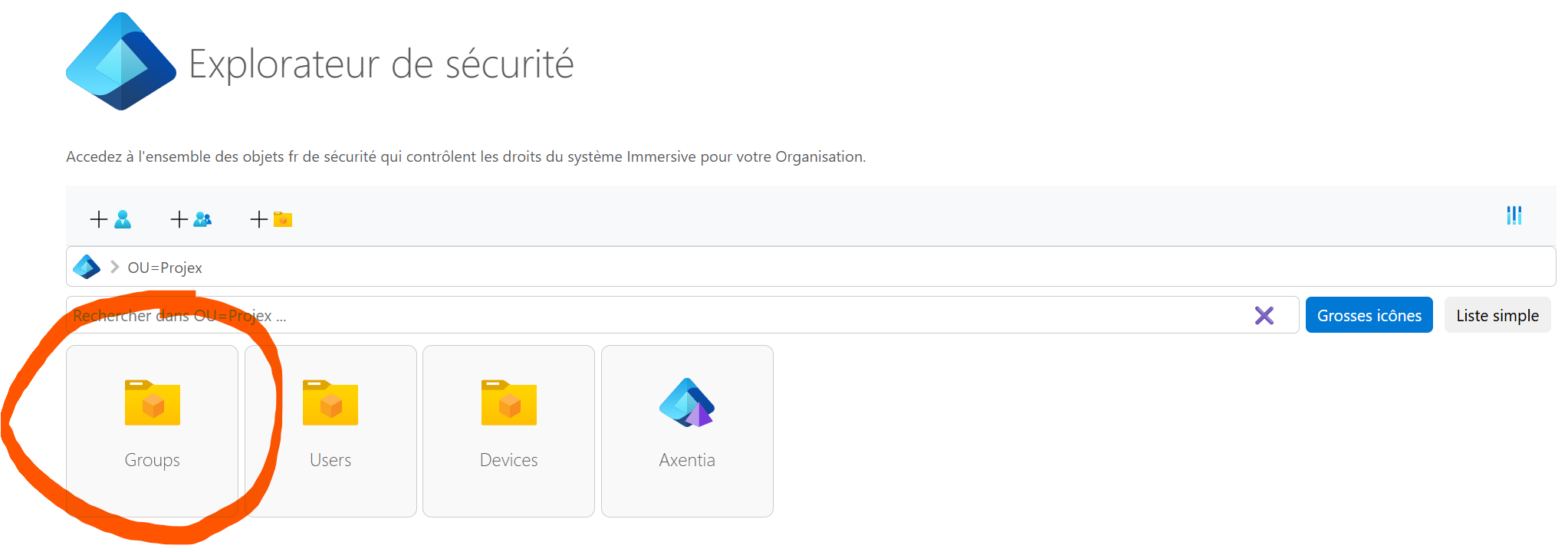
The group must be directly in the organizational unit Groups The security subdomain associated with the object's organization.
Its DistinguishedName is built like this:
RN=<Permission.Name><NomTechniqueDuType>, OU=Groups, <DistinguishedNameDuSousDomaine>
For a map of the organization Paris, whose subdomain is OU=Paris, DC=Immersive, the expected reading group is for example:
RN=ReadMap, OU=Groups, OU=Paris, DC=Immersive
A group with the same name in another organization or unit is not the group you are looking for for this object.
3. What is actually attributed
The group is not added as a member of the business object. RestFrontage creates or completes a Right, that is, a line of law connecting three elements:
Element of the Right |
Value |
|---|---|
| Beneficiary | The ID of the permission group. |
| Secure object | The identifier of the object created. |
| Secure Type | The type identifier of the object. |
| Authorization | Flag of permission added to AuthorizedFlags. |
| Refusal | No refusals added by this agreement. |
If a right already exists for that group and purpose, the Flag of the permission is merged with the existing permissions. Other permissions carried by the same right are preserved.
This agreement only produces authorizations. To automatically produce a refusal, you must set up an automatic rule of law with the effect Refuse.
4. Application during creation
When an object is created by a scan connected to the security mechanism, RestFrontage does the following:
- Save the business object.
- Determine its secure type and technical name.
- Find the organization and its security subdomain.
- Load all permissions of the type.
- Construct the expected group name for each permission.
- ignore groups that do not exist;
- create or supplement the rights of found groups;
- Save security changes and refresh the affected domain and caches.
All valid permissions of the type are examined. If more than one conventional group exists, each is granted the corresponding right to the new object.
The same calculation also applies the rules configured in Automatic fees. The rights generated by the rules and those generated by the treaty groups are merged per beneficiary.
4.1 Creation by Secure OData Controllers
The OData façade of a secure object triggers the computation after the new object is saved.
This mechanism is used in particular by the secure paths of cards, equipment, workspaces, folders and supervision scopes which are basic secure objects.
4.2 Creating a folder in Explorer
Creating a folder from Explorer explicitly calls for the same calculation. The folder must be associated with an organization that corresponds to an active security subdomain.
5. Requirements
Conventional law is produced only if all of the following conditions are met:
- The type of the object is recognized as a secure type by the path used.
- at least one permission exists for this type in the
Domainloaded; - The permission has a non-empty name and a
Flagdifferent from0; - the organization of the object makes it possible to find a security subdomain;
- The group exists in
OU=Groupsof this subdomain with the expected name; - The authoring path calls the automatic rights resolver.
The mere presence of the group does not initiate a global processing of all objects of the type. The mechanism is executed when a plugged creation or a regularization requested from the security tools is performed.
6. Existing Items
The creation of a permission group is not retroactive. Objects that existed before the group do not automatically receive its right.
To deal with the existing one:
- Open Security, then Security Tools ;
- Open Automatic rights of existing objects ;
- Select the object type and, if necessary, the organization.
- launch the audit;
- Controlling Marked Objects Incomplete ;
- Use Regularize or Regularize the selection.
The audit uses the same type technical name, permissions, conventional groups, and automatic entitlement rules as the creation path.
Regularization adds or supplements the expected rights. It does not remove the additional rights that are already present.
7. Example with a map
Configuration:
| Information | Value |
|---|---|
| Secure Type | Map, identifier 15 |
| Permission Name | Read |
| Flag | 1 |
| Organization | Paris |
| Group | RN=ReadMap, OU=Groups, OU=Paris, DC=Immersive |
When a new map of the Paris organization is created by the secure controller:
- RestFrontage constructs the name
ReadMap; - he found this group in the Paris subdomain;
- it creates a
Rightbetween the group and the new map; - he adds the mask
1inAuthorizedFlags.
A user who is a member of ReadMap, directly or through another group, can then benefit from this authorization on the card.
8. Example with a folder
The historical permission names of the folders already contain the word Folder. The technical name of the type is nevertheless added a second time by the convention.
| Permission.Name | Technical type | Expected group |
|---|---|---|
Folder See |
Folder |
Folder SeeFolder |
Folder Read |
Folder |
Folder ReadFolder |
Folder Modify |
Folder |
Folder ModifyFolder |
Folder Write |
Folder |
Folder WriteFolder |
Folder FullControl |
Folder |
Folder FullControlFolder |
These names may seem redundant, but they correspond exactly to the current calculation. For example, create a group ReadFolder does not replace Folder ReadFolder.
9. Renaming a Permission
The group name is recalculated from the current value of Permission.Name. Renaming a permission therefore immediately modifies the group you are looking for for the next creations and for the next audits.
Renaming does not automatically remove rights that were already registered with the old group. Before renaming a permission:
- determine the new conventional name;
- Create or rename the necessary groups in each organization.
- control their members;
- Initiate auditing of existing objects.
- check separately the old rights that have become useless before any deletion.
10. What the mechanism does not do
The group agreement does not automatically do the following:
- Create the missing group.
- Add users to the group.
- Immediately process all existing objects when the group is created.
- Protect an object created by a journey that doesn't trigger automatic rights.
- Create a denial of access.
- Remove old rights when a group or permission is renamed or deleted.
11. Troubleshooting
| Symptom | Audits |
|---|---|
| The group exists but no rights are created | Check its exact name, location in OU=Groups, the organization of the object, the technical name of the type, and the creation path. |
The group ReadMap works in one organization but not another |
Each subdomain must have its own group under its unit Groups. |
| The new items are okay but the old ones are not | Launch the audit and then the regularization of automatic rights. |
| The right exists but the user remains denied | Check group membership, nested groups, any DeniedFlags and the permission actually tested by the course. |
| The way it works changes after renaming a permission | Recalculate the name with the new value of Permission.Name, then regularize the existing one. |
| A folder group with a simplified name is not recognized | Use the full name, for example Folder ReadFolder. |
12. Commissioning Checklist
- The technical type of the object is identified.
- The exact value of
Permission.Nameis known. - The name of the group is the exact concatenation of the two values.
- The group is under
OU=Groupsin each organization involved. - Users or business groups are members of the permission group.
- A new test object receives the expected entitlement.
- Existing objects have been audited and regularized.
- Any refusals were checked separately.
- Any creative that is done outside of the standard pipeline explicitly applies automatic entitlements.