SSO under Immersive
- Undefined type
Configuration
This documentation describes how to configure RestFrontage SSO, attach Immersive accounts, and SAML 2.0 and OpenID journeys. It is intended for Immersive administrators, identity federation managers, and integrators of client applications.
The addresses, identifiers, and accounts in the examples are fictitious.
In this article
1. Understanding SSO in Immersive
The Single Sign-On, or SSO, allows a user to authenticate to an external identity provider and then access an Immersive application. The identity provider, called IdP, manages the sign-in, and can enforce its own requirements, such as multi-factor authentication.
RestFrontage then finds an Immersive account from the external identity, verifies the status of that account, and issues an Immersive authentication token. The rights used by the application remain those of the account, its groups, and its entitlements in Immersive.
1.1 The three elements to distinguish
| Element | Role |
|---|---|
| External identity | Identifies the person to the IdP. They must be able to be reconciled with an Immersive account. |
| Immersive Account | Carries the account status and its rights to the platform's objects and functions. |
| Immersive Token | Is returned by RestFrontage after authentication and is used for subsequent exchanges with the API. The duration of the Frontage depends on the configuration of the application. |
The IdP access token, SAML response, and Immersive token are different elements. Successful authentication at the IdP is not enough to grant rights in Immersive.
flowchart TD
    A["Authentification auprès du fournisseur d’identité"] --> B["Identité externe"]
    B --> C{"Compte Immersive correspondant ?"}
    C -->|"Non"| X["Connexion refusée"]
    C -->|"Oui"| D{"Compte activé, non expiré et non verrouillé ?"}
    D -->|"Non"| X
    D -->|"Oui"| E["Émission d’un jeton Immersive"]
    E --> F["Accès selon les droits du compte et de ses groupes"]
1.2 The two courses available
RestFrontage provides two external authentication paths: SAML and OpenID. They both allow you to find an existing Immersive account, check its status and issue an Immersive token. The rights remain those of the account and its groups.
These journeys differ in how the client and RestFrontage interact with the identity provider:
| Connection stage | With SAML | With OpenID |
|---|---|---|
| Start external authentication | The client asks RestFrontage for a SAML URL, and then opens the identity provider's sign-in page. | The client authenticates with the identity provider to obtain an external access token. |
| Transmit the result to RestFrontage | The browser passes an XML SAML response to RestFrontage. | The client passes the external access token to RestFrontage. |
| Identify the external account | RestFrontage reads the account attribute in the SAML response. | RestFrontage calls tokeninfo and then userinfo and reads the login property. |
| Complete Immersive Connection | The client exchanges the SAML request ID for an Immersive token, after account verification. | RestFrontage issues an Immersive token after calls to the identity provider and account verification. |
When the identity provider and the client application are compatible with the supported paths, the connection is done by configuring the RestFrontage, the identity provider and the client, and then by attaching the Immersive accounts. No specific connection development is then necessary. However, adaptation may be required if the expected exchanges or the security requirements of the deployment are not covered by the implementation.
1.2.1 Correspondence with the Immersive account
RestFrontage uses the account name received from the identity provider to search for an Immersive user. This value must match the External Home Account Name, called AssociatedExternalUserAccountName in the template.
With SAML, the value comes from an attribute in the XML response sent by the identity provider. RestFrontage first looks for the named attribute cn. If it is absent, it looks for the named attribute http://schemas.xmlsoap.org/ws/2005/05/identity/claims/name.
The identity provider administrator configures the passed attributes for the Immersive app. The name cn here designates an attribute of the SAML response: RestFrontage will not look for this value directly in a directory. The SAML field NameID is not used to find the Immersive account.
With OpenID, the value comes from the property login of the JSON document returned by the service userinfo of the identity provider.
For example, if the Immersive account has agent.demo as the external home account name, the retained SAML attribute or the OpenID property login must contain agent.demo.
1.2.2 Routes defined in RestFrontage
The following paths are defined in the application. They are relative to the base address under which RestFrontage is published.
| Function | Method and relative path |
|---|---|
| Get SAML sign-in URL | GET /api/Saml/GetSamlUrl |
| Receive SAML sign-in response | POST /api/Saml/Login |
| Get the Immersive token after SAML return | POST /api/Saml/Authenticate |
| Get SAML Logout URL | GET /api/Saml/GetSamlLogoutUrl |
| Receive SAML Logout Feedback | GET or POST /api/Saml/Logout |
| Verify the external token with OpenID services | GET /api/OpenID/CheckToken |
| Get the Immersive Token from the External Token | POST /api/OpenID/Authenticate |
These routes are presented for technical reference, in particular to understand the exchanges and facilitate diagnosis. With an Immersive player that supports the configured SSO mode, their use is managed by the connection path: the player triggers the necessary requests, the browser transmits the responses from the identity provider and RestFrontage performs the server processing. The administrator does not have to call these routes manually.
The OpenID controller doesn't define a route to open the connection to the identity provider or to perform a federated logout. These operations depend on the client's integration with the identity provider.
The SAML logout return does not explicitly revoke the Immersive tokens in the method examined. The closure of the session at the identity provider and the end of the Immersive access should therefore be checked separately.
1.2.3 Server Configuration Sections
Saml and OpenID are sections of the RestFrontage application configuration, placed at the root of the Rest Frontage configuration file appsettings.json. Their values can also be provided by the hosting's environment variables.
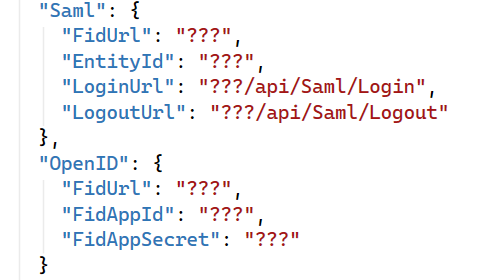
- The section Saml contains the identity provider addresses, the Immersive service ID, and the public URLs returning to RestFrontage.
- The section OpenID contains the base address of the tokeninfo and userinfo services and the application identifier expected by RestFrontage.
SAML settings LoginUrl and LogoutUrl indicate the public URLs that lead to the routes /api/Saml/Login and /api/Saml/Logout. They do not create new roads.
The name of the OpenID section does not mean that any OpenID Connect provider can be connected by simply entering its URL. The controller depends on a specific contract with tokeninfo, userinfo, client_id, access_token, realm and login. Check this contract before choosing this path.
1.2.4 SAML Journey
The identity provider passes a SAML response through the browser. The client then exchanges the identifier for that connection for an Immersive token. The schema shows the journey when all steps are successful.
sequenceDiagram
    participant C as Client et navigateur
    participant R as RestFrontage
    participant I as Fournisseur d’identité

    C->>R: Demander l’URL de connexion SAML
    R-->>C: URL de connexion
    C->>I: Ouvrir la connexion et s’authentifier
    I-->>C: Réponse SAML
    C->>R: Transmettre la réponse SAML
    R->>R: Retrouver le compte externe et mémoriser la demande
    R-->>C: Retour de connexion
    C->>R: Envoyer l’identifiant de demande chiffré
    R->>R: Retrouver la demande et vérifier l’état du compte
    R-->>C: Jeton Immersive et utilisateur
SAML return is not yet full Immersive authentication. The client must complete the exchange to obtain the Immersive token.
1.2.5 OpenID Journey
The client first gets an external access token. RestFrontage then queries the identity provider's services to find the Immersive account. The diagram shows the specific path for this release, when all steps are successful.
sequenceDiagram
    participant C as Client Immersive
    participant R as RestFrontage
    participant I as Fournisseur d’identité

    C->>I: S’authentifier et obtenir un jeton d’accès
    I-->>C: Jeton d’accès externe
    C->>R: Envoyer le jeton externe chiffré
    R->>I: Appeler tokeninfo
    I-->>R: client_id, access_token et realm
    R->>R: Comparer client_id avec FidAppId
    R->>I: Appeler userinfo avec le jeton retourné
    I-->>R: Identité contenant login
    R->>R: Retrouver le compte Immersive à partir de login
    R->>R: Vérifier l’état du compte
    R-->>C: Jeton Immersive et utilisateur
The external access token is used for exchanges with the identity provider. The returned Immersive token is then used for access to the platform, depending on the account's rights.
2. Preparing the connection
2.1 Information to be gathered
| Information | To be obtained from |
|---|---|
| RestFrontage HTTPS public URL, including any path prefix | Immersive Operator Team. |
| Client application URL and expected sign-in path | Immersive Operator Team. |
| Target environment and network access allowed | Operations and network teams. |
| Stable external identifier of the pilot user | Identity team. |
| SAML URLs and parameters, or OpenID services agreement | Administrator of the IdP. |
| Immersive account driver, groups and rights required | Immersive administrator. |
For SAML, the browser must be able to join the IdP and then pass the response to the public RestFrontage URL. For OpenID, RestFrontage must also be able to directly call the IdP's tokeninfo and userinfo services.
Maintain operational administrative access during acceptance. Use a validation environment and a pilot account before generalizing the connection.
2.2 Configuration location
The Saml and OpenID sections are loaded when RestFrontage starts. They can be populated in the environment configuration files or by the process environment variables.
SAML and OpenID services retain the options they received when they were created. Reboot the RestFrontage instance after changing these options, even if the configuration provider knows how to reload a file.
Examples of environment variable names:
Saml__FidUrl
Saml__FidSsoPath
Saml__FidSloPath
Saml__EntityId
Saml__LoginUrl
Saml__LogoutUrl
OpenID__FidUrl
OpenID__FidAppId
OpenID__FidAppSecret
Double underscores separate the section and the name of the parameter. Use the configuration mechanism provided by the hosting to provide these values to the application.
Example appsettings.json on these two sections:
  "Saml": {
    "FidUrl": "???",
    "EntityId": "???",
    "LoginUrl": "???/api/Saml/Login",
    "LogoutUrl": "???/api/Saml/Logout"
  },
  "OpenID": {
    "FidUrl": "???",
    "FidAppId": "???",
    "FidAppSecret": "???"
  }
The ??? values in the reference appsettings.json file are fill-in-the-blank locations. This file does not provide a usable SSO configuration. It also does not contain all of the SAML settings supported by the option classes.
3. Attach external users
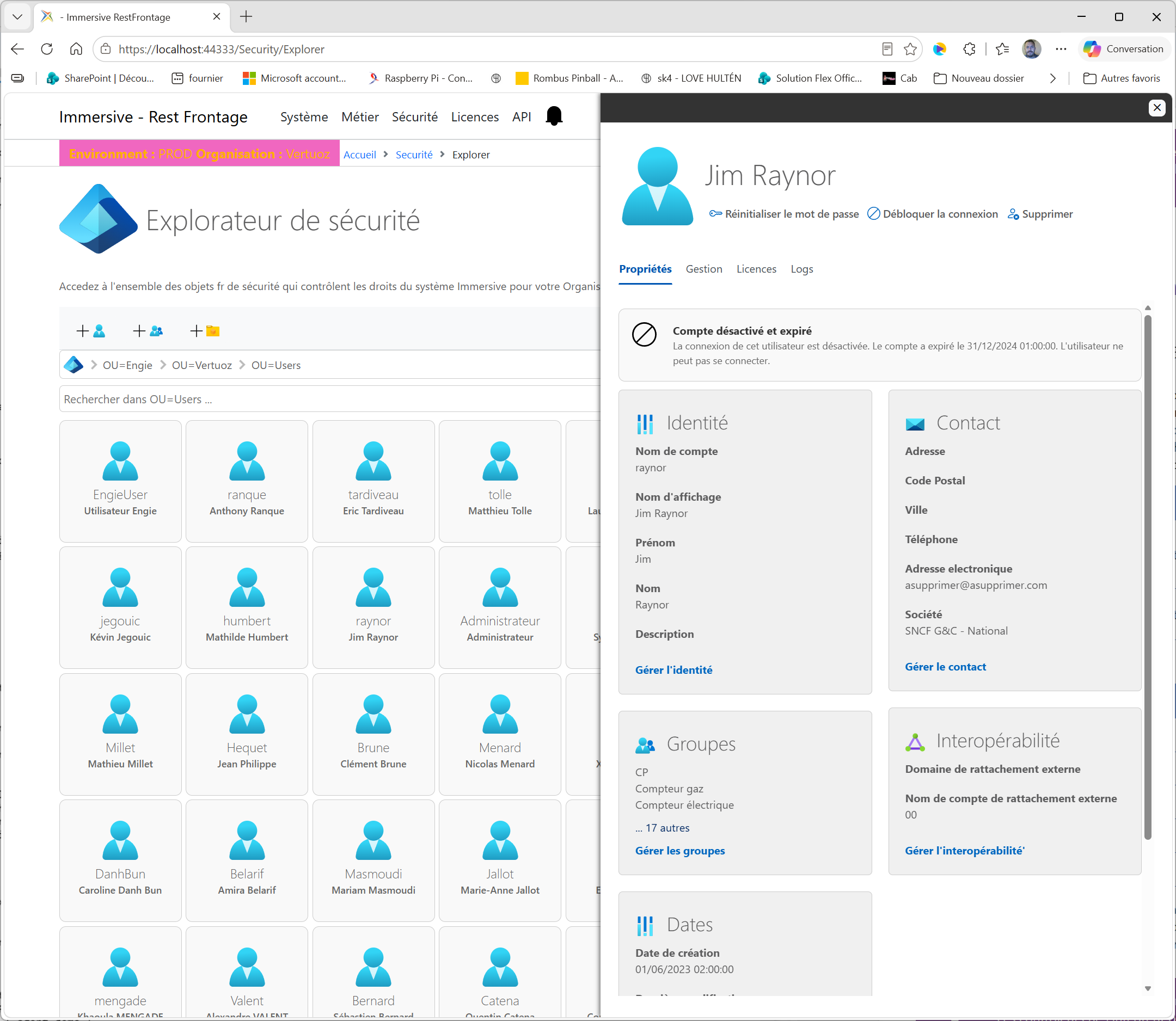
3.1 Configure the user card
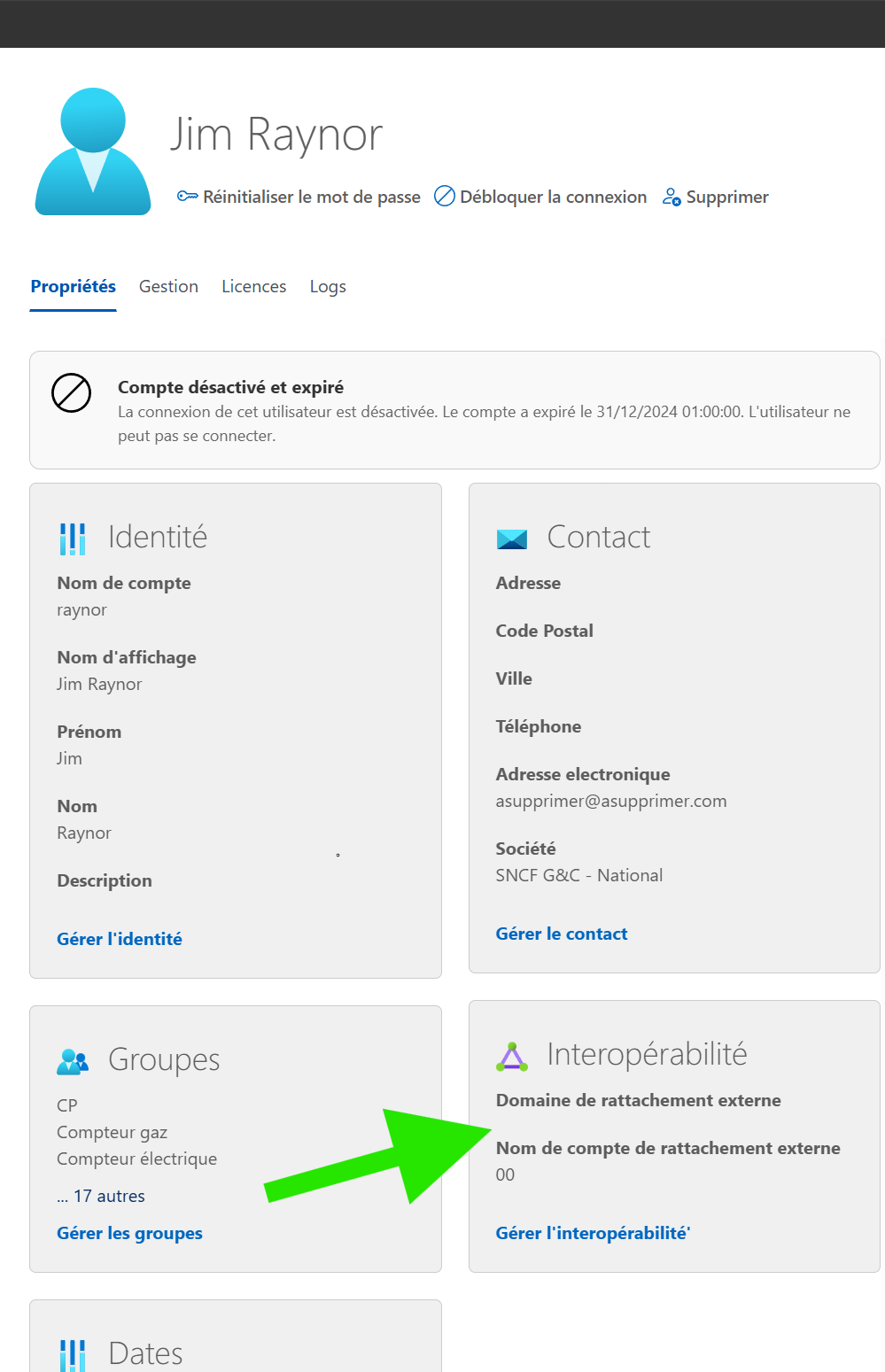
- Open the account card in RestFrontage Security User Management.
- Locate the block Interoperability and open Manage interoperability.
- Inquire Now External home domain to describe the account's domain of origin.
- Inquire Now External Home Account Name with the exact expected value of the IdP.
- Save the card, and then verify that the account is enabled and that its groups and rights are correct.
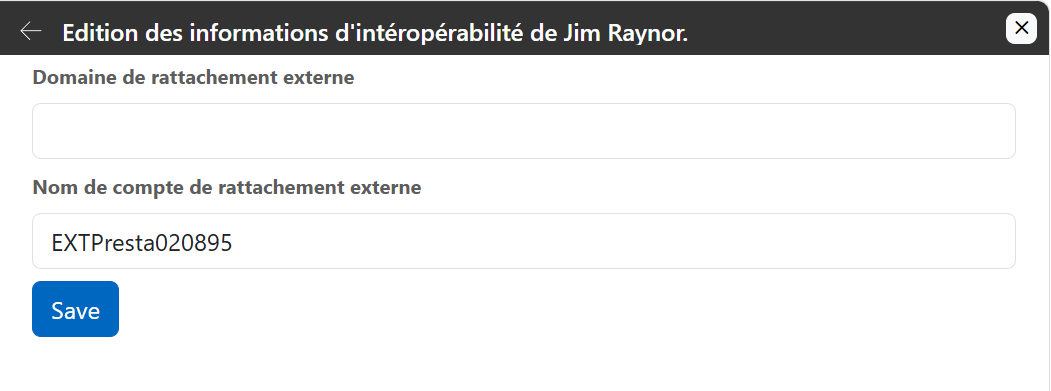
| Field | Property | Use in the Pathways Examined |
|---|---|---|
| External home domain | AssociatedExternalUserDomain | Available field in the card; it is not used by the SAML and OpenID account searches examined. |
| External Home Account Name | AssociatedExternalUserAccountName | The reconciliation key used to find the Immersive user. |
Example of correspondence to prepare:
| Data | Example |
|---|---|
| Immersive Account Name | operator.driver |
| Populated external domain | COMPANY |
| External account name entered | agent.demo |
| Received cn value in SAML | agent.demo |
| Login value received in OpenID | agent.demo |
The local account and the external account can have different names. However, the value received from the IdP must match the external attachment field. Exact case and character settings: the code does not perform common normalization, and the sensitivity of some SAML searches also depends on the database.
Do not use the external domain to decide between two users with the same external account name: these controllers do not include it in their search. Provide a unique match in the queried scope, even when multiple identity domains are present.
3.2 Immersive Account Access Conditions
The account must already exist. No automatic user or group provisioning from SAML or OpenID attributes appears in these journeys.
The Immersive token is denied issuance when the account is deactivated, expired, or locked. Controllers check IsEnabled, ExpirationDate, and LockoutUntilUtc, among other things. An expired account is disabled in the authentication path.
Roles or groups passed by the IdP are not automatically transformed into Immersive rights by these controllers. Assign rights to the account or its groups in Immersive and verify them after login.
4. Configure SAML
4.1 RestFrontage Parameters
| Parameter | Role | Fictional example |
|---|---|---|
| Saml:FidUrl | The basis of the identity provider URL. | https://idp.example.net |
| Saml:FidSsoPath | Path added to FidUrl for connection. | /saml/sso |
| Saml:FidSloPath | Path added to FidUrl for federated logout. | /saml/slo |
| Saml:EntityId | The identifier of the Immersive service declared to the IdP and placed in Issuer. | urn:example:immersive:recipe |
| Saml:LoginUrl | The public URL for receiving the connection response, or ACS. | https://rest.example.net/api/Saml/Login |
| Saml:LogoutUrl | Logout return public URL. | https://rest.example.net/api/Saml/Logout |
The service constructs the destinations by direct concatenation of FidUrl and the path. With the example above, the connection destination is https://idp.example.net/saml/sso. Avoid double slashes, missing slashes, and paths that already carry a query string: Does the service add itself? SAMLRequest=.
FidSloPath and LogoutUrl are for the logout path. For a connection that includes this path, fill them in and test them separately from the connection.
{
  "Saml": {
    "FidUrl": "https://idp.example.net",
    "FidSsoPath": "/saml/sso",
    "FidSloPath": "/saml/slo",
    "EntityId": "urn:example:immersive:recette",
    "LoginUrl": "https://rest.example.net/api/Saml/Login",
    "LogoutUrl": "https://rest.example.net/api/Saml/Logout"
  }
}
The paths /saml/sso and /saml/slo are illustrative. Replace them with the addresses provided by the IdP administrator. Report any public prefix for RestFrontage in LoginUrl and LogoutUrl.
See the presentation of the Rest Frontage Configuration file
4.2 Declare the service to the IdP
- Declare the corresponding Immersive application or service provider in the target environment.
- Report the EntityId value exactly like the service provider identifier.
- Declare LoginUrl as the ACS URL receiving the response via HTTP POST.
- For federated logout, declare the LogoutUrl return and check the behavior expected by the IdP.
- Configure the attributes needed to reconcile the account and provide a pilot user with permission to access this application.
- Verify the signing and validation requirements outlined in the chapter on limits before opening in production.
The service issues a SAML 2.0 AuthnRequest, compressed with Deflate and then encoded in Base64 and in the URL. It specifies an HTTP POST return and a NameID policy in transient format. When forceAuthentication is true, it appends ForceAuthn to the request.
These characteristics must be accepted by the IdP. The code under review does not provide SAML metadata URLs or a signing certificate option in SamlOptions. Therefore, it is not enough to invent a MetadataUrl or Certificate parameter to enable them.
4.3 Expected data in response
| Data | Usage |
|---|---|
| InResponseTo on SAML Response | Used as a request identifier, to find the journey launched by the customer. |
| SessionIndex in AuthnStatement | Necessary for connection response recognition; retained for logout. |
| cn attribute | The first attribute searched for the external account name. |
| Attribute http://schemas.xmlsoap.org/ws/2005/05/identity/claims/name | Alternative used if cn is absent. |
Account matching relies on a SAML attribute. The mere presence of a NameID, email address, or sub attribute does not override cn or the expected name attribute. If cn is present, it takes precedence over the alternate attribute.
Configure a simple, unique value for this attribute. The parser retains the first AttributeValue of each attribute; multiple groups and attributes are not a mechanism for assigning rights.
4.4 Connection Path
A customer like the Beholder will follow the following steps to make a connection via SSO SAML.
The client automatically prepares two values to start the connection. requestId is an identifier generated on each retry: it is used to link the SAML request to the return of the identity provider.
Immersive Beholder generates a GUID and constructs an identifier that also contains the return address. forceAuthentication is a customer choice: false allows the identity provider to reuse an existing session, according to its policy, while true requires reauthentication, even if a session already exists. The Beholder uses false by default. Both values are managed by the customer: the administrator does not have to retrieve or enter anything.
The steps are as follows:
- The client creates an attempt-specific request ID and calls GET
/api/Saml/GetSamlUrlwith requestId and forceAuthentication. - RestFrontage returns a JSON string containing the SAML login URL; this call doesn't directly redirect the browser.
- The client opens this URL and the user authenticates to the IdP.
- After authentication, the identity provider forwards the response SAML by the navigator, in HTTP POST, to the URL in
Saml:LoginUrl. In our previous example, this value ishttps://rest.example.net/api/Saml/Login: This is the point of receipt provided by RestFrontage to automatically handle the processing of the return SAML. - RestFrontage retrieves the expected data and attempts to save the request and session index to the corresponding external account.
- The client encrypts the request ID with the Immersive security context and sends it to POST /api/Saml/Authenticate.
- RestFrontage retrieves the account, checks its state, and returns an AuthenticationToken containing the token and the Immersive user.
A SAML return page or LoggedIn=ok redirect does not prove that the Immersive account is authenticated. Functional validation must go all the way up to the success of /api/Saml/Authenticate and the expected access to the application.
For clients that use a redirect, the code knows how to interpret an identifier containing a _redirect= destination, possibly encoded in hexadecimal. Launchers in RestFrontage construct this format. Use the client intended for this integration rather than fabricating an arbitrary return URL.
4.5 SAML Logout
An authenticated Immersive user can request GET /api/Saml/GetSamlLogoutUrl with a requestId. The service constructs the logout request from the external account and the retained SessionIndex. The IdP then returns its response to /api/Saml/Logout, who accepts GET and POST.
Logoff at the IdP, clearing client data, and invalidation of Immersive access are separate operations. The examined Logout return displays a page or redirects; it does not explicitly revoke the Immersive tokens in this method. Verify the full behavior of the client before considering the logout to be effective on all accesses.
4.6 Example of connection to Microsoft Entra ID
This example describes how to prepare a SAML 2.0 hook from the metadata passed by the client. The Entra tenant and application credentials, client name, hostname, and user account have been replaced with placeholders. No actual SAML certificates or responses are reproduced.
Reading the metadata confirms the services published by the IdP. It does not constitute a validation of the complete connection from an Immersive player.
4.6.1 Read identity provider metadata
The Entra administrator provides a URL like this:
https://login.microsoftonline.com/11111111-2222-3333-4444-555555555555/federationmetadata/2007-06/federationmetadata.xml?appid=aaaaaaaa-bbbb-cccc-dddd-eeeeeeeeeeee
The first identifier designates the Entra tenant. The appid parameter designates the Entra application in question; it does not replace the SAML EntityId chosen for Immersive.
This file can contain multiple protocol descriptions. For SAML 2.0, read the IDPSSODescriptor section, including the SingleSignOnService, SingleLogoutService, and KeyDescriptor elements that are used for signing.
| Extracted data | Example fictitious value | Usage |
|---|---|---|
| entityID of the IdP | https://sts.windows.net/11111111-2222-3333-4444-555555555555/ | Identify the trusted issuer when validating assertions. This value should not override Saml:EntityId. |
| SingleSignOnService, HTTP-Redirect | https://login.microsoftonline.com/11111111-2222-3333-4444-555555555555/saml2 | The destination of the connection request. |
| SingleLogoutService, HTTP-Redirect | https://login.microsoftonline.com/11111111-2222-3333-4444-555555555555/saml2 | The destination of the federated logout request. |
| Signing Certificate | Public certificate present in KeyDescriptor | Verify SAML signatures; also schedule its renewal. |
The metadata URL is used to describe the identity provider. It should not be used as a sign-in destination. In this release, RestFrontage does not automatically load this file, and SamlOptions does not expose any metadata, certificate, or trusted issuer settings.
4.6.2 Prepare the RestFrontage configuration
In this example, the address of the RestFrontage is https://rest.example.net:44348 and the agreed SAML identifier for Immersive is urn:example:immersive:client-example:production.
Report the appropriate values in the Saml section of the configuration actually loaded by the environment, and then restart RestFrontage after applying the configuration:
{
  "Saml": {
    "FidUrl": "https://login.microsoftonline.com/11111111-2222-3333-4444-555555555555",
    "FidSsoPath": "/saml2",
    "FidSloPath": "/saml2",
    "EntityId": "urn:example:immersive:client-exemple:production",
    "LoginUrl": "https://rest.example.net:44348/api/Saml/Login",
    "LogoutUrl": "https://rest.example.net:44348/api/Saml/Logout"
  }
}
RestFrontage constructs the addresses of the IdP by concatenating FidUrl with FidSsoPath or FidSloPath. Do not add a final slash to FidUrl in this example.
LoginUrl uses the built-in return route of RestFrontage to let it automatically process the connection response. LogoutUrl denotes its disconnection return. Keep the HTTPS schema, hostname, port, and any deployment prefix in the full addresses.
4.6.3 Have the application declaration confirmed in Entra
The customer's administrator must verify the following values in the relevant enterprise application:
| Entra parameter | Dummy value to be recorded |
|---|---|
| Identificateur / Identifier (Entity ID) | urn:example:immersive:client-example:production |
| Reply URL (ACS) | https://rest.example.net:44348/api/Saml/Login |
| URL de déconnexion / Logout URL | https://rest.example.net:44348/api/Saml/Logout |
The URN and ACS URL must exactly match the RestFrontage configuration. Publishing the IdP metadata does not prove that these values have been saved. The logout must be validated separately, especially for Entra-initiated requests.
4.6.4 Set the account attribute and prepare a pilot user
For this example, agree to pass the user's Entra login, or UPN, in the following SAML attribute:
http://schemas.xmlsoap.org/ws/2005/05/identity/claims/name
In Entra attributes and claims, check the name name, the http://schemas.xmlsoap.org/ws/2005/05/identity/claims namespace, and the user.userprincipalname source. The actual mapping must be confirmed with the client; it cannot be deduced from the metadata alone.
In the Immersive driver account card, populate AssociatedExternalUserAccountName with the same value, for example, utilisateur@example.net. If a cn attribute is also emitted, it takes precedence in the current processing: it must be absent or contain the expected value for the Immersive account.
The Immersive account must already exist, be active, and have the necessary rights. Assign the pilot user to the Entra app as well. The current SAML journey does not automatically create the account or synchronize its rights.
4.6.5 Complete SAML validation prior to testing with live accounts
Configuring addresses is not sufficient to secure the connection. In the version under review, processing extracts XML attributes without cryptographically validating the signature, trusted issuer, audience, recipient, SAML status, and time conditions.
An adaptation must support these checks, the certificate published by the IdP and its renewal. The correlation with an actually open request and the protection against replay must also be checked. Do not add certificate or metadata parameters without a corresponding implementation.
4.6.6 Test the full journey from the Immersive client
After this adaptation, launch the SAML connection from the player or the Immersive launcher provided for the integration. This prepares requestId and forceAuthentication; the administrator does not have to construct these values or manually call the connection routes.
- Check the arrival on the authentication of the correct Entra tenant and the possible MFA.
- Check the HTTP POST return to the declared LoginUrl URL.
- Confirm that the attribute received matches the Immersive driver account.
- Confirm the success of the final exchange with /api/Saml/Authenticate and access to the allowed functions.
- Check the rejection of an unknown or disabled Immersive account.
- Test the disconnection and fate of Immersive sessions and tokens separately.
A LoggedIn=ok return page or redirect does not prove the success of the entire journey. In the Reader and Beholder launchers examined, the SSOToken tracking cookie expires after 30 seconds: this delay must be reviewed to allow interactive authentication, especially with MFA.
The synchronization of active, deactivated, or deleted accounts remains a separate need to be specified with the customer. Receiving metadata and enabling SSO does not set up SCIM provisioning.
5. Configure the OpenID journey
5.1 Difference from a standard OIDC connection
OpenID Connect is a layer of identity built on OAuth 2.0. The standard defines the Token ID and the UserInfo endpoint, among other things. See OpenID Connect Core specification.
The RestFrontage OpenID controller uses a particular path: the client has already obtained an external access token, and RestFrontage queries the tokeninfo and userinfo services. It doesn't configure, in this path, a .well-known/openid-configuration, authorization code exchange, token ID validation, or token renewal.
Thus, Authority, MetadataAddress, CallbackPath or a /signin-oidc URL are not parameters of the OpenID section examined. The redirect URLs, scopes and methods of obtaining the token are to be defined in the integration between the client application and the IdP.
5.2 RestFrontage Parameters
| Parameter | Effective role |
|---|---|
| OpenID:FidUrl | The base URL used by RestFrontage to call tokeninfo and userinfo. Plan for a final slash if the services are under a path. |
| OpenID:FidAppId | Identifier compared to the client_id returned by tokeninfo. To be filled in for the authorized application. |
| OpenID:FidAppSecret | An option that exists in the template, but is not used by the calls of the controller being examined. It does not enable client authentication to tokeninfo. |
Minimum example of the parameters actually used by the controller:
{
  "OpenID": {
    "FidUrl": "https://idp.example.net/oauth2/",
    "FidAppId": "immersive-recette"
  }
}
With this base, calls are aimed at https://idp.example.net/oauth2/tokeninfo and https://idp.example.net/oauth2/userinfo. Without the final slash after oauth2, resolving a relative URL can remove that segment and aim for another location.
If another part of your integration requires a secret, provide it with the hosting secrets mechanism. In this controller, populating FidAppSecret does not change the behavior of outgoing calls. A requirement for Basic authentication or client_secret on tokeninfo requires an adaptation of the integration.
5.3 Expected token contract
RestFrontage makes a GET call relative to FidUrl:
tokeninfo?access_token=JETON_ACCES_EXTERNE
The controller does not add an authentication header to this call. It expects a JSON response with the following fields used:
{
  "access_token": "JETON_ACCES_RETOURNE_PAR_IDP",
  "client_id": "immersive-recette",
  "realm": "/environnement-exemple"
}
The value client_id must be FidAppId; this comparison ignores case. The returned access_token token is then used to call userinfo. The realm field serves as a parameter for this second query.
These fields describe the specific contract consumed by the code. An introspection response that contains only active, sub, or scope is not sufficient to populate this journey. The controller does not explicitly check for an active Boolean or a expires_in duration.
5.4 Expected contract from userinfo
RestFrontage then makes this call, with realm encoded in the URL:
GET /oauth2/userinfo?realm=%2Fenvironnement-exemple HTTP/1.1
Host: idp.example.net
Authorization: Bearer JETON_ACCES_RETOURNE_PAR_IDP
The JSON response must provide the login field used to find the Immersive account:
{
  "sub": "identifiant-externe-stable",
  "login": "agent.demo"
}
In this path, matching is done on login. The controller does not reconcile the account from sub, email address, or a group. The login field is a requirement of this integration; it is not an attribute guaranteed by all OIDC providers.
The standard provides for the verification of the consistency of sub between UserInfo and the Token ID. This check is not performed in the path examined, which does not validate the Token ID. See UserInfo in OpenID Connect Core.
5.5 Connection Path
- The client application obtains an external access token from the IdP according to its own sign-in journey.
- It can call GET /api/OpenID/CheckToken with the token as a parameter to verify the tokeninfo and userinfo exchanges.
- It retrieves the Immersive security context, encrypts the external token, and sends it to POST /api/OpenID/Authenticate.
- RestFrontage calls tokeninfo, compares client_id, and then calls userinfo.
- RestFrontage brings login closer to the Immersive account, checks its state, and returns an AuthenticationToken.
Both OpenID routes require that the Authorization header can be parsed. However, the values in this header are not exploited by the private CheckToken method: the token actually processed comes from the decrypted token parameter or body, depending on the route. The received header therefore does not authenticate the client application in this path on its own.
A 204 return from CheckToken only confirms that this method was able to obtain a userinfo response after its client_id check. It does not verify the existence of the corresponding Immersive account, nor its status, nor its rights. Only the rest of the journey allows access to Immersive to be validated.
6. Configure the client application and access
6.1 Enable the right customer-side journey
Server options do not automatically select the connection mode in all client applications. The launcher or client must be configured for the expected protocol and for the RestFrontage URL.
The value of Login.Modes in the UserInfos.txt of the Beholder must contain at least the SAML to enable connection via SAML and/or OIDC for OpenId.
Example: the following value allows a Beholder to allow the default login in login/password via Immersive accounts but also in SAML and OIDC :
"Login.Modes" : "SAML|OIDC|DEFAULT"
The Reader and Beholder scripts examined retain the SSO ID in an SSOToken cookie for 30 seconds. A slow connection or multi-factor step can exceed this time: if the SAML return succeeds but the launcher restarts the connection, check this point in the deployed client version.
6.2 Use the Immersive Security Context
GET /api/Security/Context provides a SecurityToken containing the public encryption key. The Authenticate routes then wait for a Encrypted JSON string with the Immersive-compatible RSA mechanism.
| Road | Data to be quantified |
|---|---|
| POST /api/Saml/Authenticate | The request ID recognized after SAML return. |
| POST /api/OpenID/Authenticate | External access token obtained from the IdP. |
The HTTP body shape is a JSON string, as in this example of a non-executable structure:
"DONNEE_CHIFFREE_PAR_LE_CLIENT_IMMERSIVE"
This body is not an object containing encryptedData, a plaintext identifier, or SAML XML. Use the compatible encryption implementation provided to the client. The public key does not override HTTPS.
6.3 Check rights after login
After issuing the token, verify the Immersive identity actually returned, the groups of the account and its rights to the necessary functions and objects. Also test a function that must remain prohibited to the pilot account.
SAML and OpenID controllers do not constitute a global entitlement. SSO establishes identity; the platform's authorization rules then determine access.
7. Route Reference
| Method and route | Usage | Expected context |
|---|---|---|
| GET /api/Security/Context | Provides the Immersive public key. | Accessible before authentication. |
| GET /api/Saml/GetSamlUrl | Returns the IdP URL as a JSON string. | requestId and forceAuthentication; accessible before authentication. |
| POST /api/Saml/Login | Receives the connection SAML return. | SAML response transmitted by the browser from the IdP. |
| POST /api/Saml/Authenticate | Exchanges the SAML request for an Immersive token. | An identifier encrypted in a JSON string. |
| GET /api/Saml/GetSamlLogoutUrl | Returns the IdP logout URL. | Authenticated Immersive User and requestId. |
| GET or POST /api/Saml/Logout | Receives SAML logout return. | SAMLResponse in the format expected by the controller. |
| GET /api/OpenID/CheckToken | Executes the external verification calls. | token as a query parameter and parsable Authorization header. |
| POST /api/OpenID/Authenticate | Swaps the external token for an Immersive token. | An external token encrypted in a JSON string and parsable Authorization header. |
Direct control of the OpenID token places it in the URL, just like the outgoing call to tokeninfo. Avoid saving these URLs with their parameters in access logs or in an unredacted support folder.
8. Testing the connection
8.1 Common Audits
- The URLs correspond to the target environment and are accessible by the relevant components.
- The actual configuration takes into account any overhead costs; RestFrontage has been restarted.
- The pilot account exists, has a unique external account name, and is activated, not expired, and not locked.
- A full login returns the correct user and an Immersive token.
- The account accesses an authorized function and cannot access a prohibited function.
- An external user without a matching Immersive account does not get an Immersive token.
- A deactivated, expired, or locked Immersive account does not get a token.
- Disconnecting, closing the client, and reconnecting were checked separately.
8.2 SAML Checks
- The generated URL is for the correct destination and the request contains the correct EntityId and ACS.
- The return reaches /api/Saml/Login with InResponseTo, SessionIndex, and the expected account attribute.
- The connection goes all the way to /api/Saml/Authenticate; the return page alone is not used as proof.
- A retry uses a new request identifier; replay prevention behavior is controlled.
- A journey with multi-factor authentication or slow login also ends up in the deployed client.
- The guarantees of validation of the assertions presented in the next chapter are indeed present before the production is put into production.
8.3 OpenID Verifications
- From RestFrontage, FidUrl correctly resolves tokeninfo and userinfo.
- tokeninfo provides the required fields and client_id corresponds to FidAppId.
- UserInfo provides a non-empty login for the pilot account.
- A token that is expired, revoked, or issued for another application is denied on the entire path.
- The authentication requirements of the IdP services are compatible with the calls actually made.
- The compatibility of the client application, the IdP, and this version of RestFrontage is established beyond a single return 204.
These points are a test plan to be executed. They do not describe tests that have already been performed on a server or IdP.
9. Diagnosing common difficulties
| Symptom | Priority Verification |
|---|---|
| SAML login URL is invalid | Check the FidUrl + FidSsoPath concatenation and the configuration actually loaded. |
| IdP denies SAML request | Compare EntityId, ACS, binding, NameID policy, and signing requirements with the IdP declaration. |
| The connection return shows an error or remains without useful result | Check the format of the return, InResponseTo, SessionIndex, cn, or the alternate name attribute. A simple successful HTTP code is not a complete proof of connection. |
| The return page appears, but Authenticate fails | Verify the external account, the transmitted request ID, its possible consumption, and the body encryption. |
| The Launcher Loops After SAML Return | Check the cookies, return destination, and 30-second duration of SSOToken in the affected launchers. |
| Invalid request for given user en OpenID | Check both IdP calls, client_id, login and the connection to the Immersive account. |
| CheckToken succeeds, but Authenticate fails | Verify the existence and status of the Immersive account as well as the encryption of the external token. |
| tokeninfo or userinfo returns 404 | Check FidUrl, its final slash and the actual paths of the IdP. |
| The IdP demands a secret despite FidAppSecret being populated | The controller does not use this secrecy for his calls; have the connection adapted. |
| The account is reported as locked or deactivated | Check IsEnabled, ExpirationDate, and LockoutUntilUtc in the Immersive account. |
| Connection succeeds, but business access is denied | Verify Immersive authorisations; external authentication does not grant business rights. |
| IdP logout does not stop all access | Verify the client's session data and the lifecycle of the Immersive token. |
Logs may include "Request SSO Login for Outside CN", "SSO Login for Outside CN", "SSO Login Failed for Request", or a disabled or locked account event. Correlate the time, driver account, and journey stage. Redact tokens, SAML responses, and personal data before transmitting traces.
10. Limitations of the version under review
10.1 SAML validation to be processed before a production exposure
The path examined decodes the SAML response and extracts its attributes. It does not show cryptographic verification of signature, IdP chain of trust, audience, recipient, SAML status, or time conditions of the assertion. No IdP certificate or metadata options are exposed by SamlOptions.
Therefore, the presence of this data in a response does not prove its authenticity. The requirements for validating the SSO profile are described in the OASIS SAML 2.0 profiles, section 4.1.
The configuration shown documents existing exchanges; it does not, on its own, make the processing of SAML assertions compliant with validation requirements. Prior to a production exposure, have these controls added or establish that a trusted component actually applies them and that the receiving point cannot be bypassed. This assurance has not been established by this analysis.
The code persists the request and session index in the user's Code field. It attempts to clear the request ID when it is exchanged for a token. This consumption is not a signature check and is not sufficient to demonstrate complete protection against replay; the result of the erasure method is not imposed as a condition of success by the caller.
The parser also reads the body of the SAML return as a string and removes the SAMLResponse= prefix. It does not treat this body as a complete set of form fields. Recipe the actual responses of the IdP, especially when they have RelayState or other fields.
10.2 OpenID compatibility to be confirmed
The code controls client_id and then exploits login. It does not implement generic OIDC token validation, nor does it implement a stable match based on the issuer and subject pair. It does not explicitly check active, scopes, or expiration in tokeninfo. The denial of a revoked or expired token must therefore be confirmed in the actual behavior of the IdP services and in the full recipe.
The configured secret is not used in this path. Received authorization headers are not used as proof of identity for the calling client. These points limit compatible IdP contracts and should be considered if client authentication is required.
Do not advertise validated compatibility with Microsoft Entra ID, Keycloak, AD FS, or any other vendor on the presence of SAML and OpenID routes alone. Each vendor and version requires contract and full path verification.