Secure object permissions and rights
- Undefined type
This document presents the server's object-based security model: secure objects, permissions, flag masks, permissions and denials, groups, internal shares, and permissions provided during installation.
1. Overview
The system answers the following question:
Does a given user have a given permission on a given business object?
It connects four concepts.
| Concept | Main class | Role |
|---|---|---|
| Beneficiary | DomainSecurityObject |
A user, group, or other security principal to which a right can be assigned. |
| Target | SecurizedObject |
A security reference to the protected business object. |
| Permission | Permission |
A testable action for an object type, represented by a bit mask. |
| Law | Right |
Associating between a recipient and a target, with one mask allowed and one mask disapproved. |
A right can therefore be read as follows:
The group
Operatorsreceives authorized flags0x13and flags refused0x04on equipment 42.
The server does not just look for a right directly carried by the user. It also takes into account his group memberships, including nested groups. An applicable refusal is evaluated before authorizations.
2. The principle of SecurizedObject
2.1 A Security Reference, Not the Business Object
SecurizedObject is a lightweight entry in the security model that designates a target with two values:
| Property | Meaning |
|---|---|
Identifier |
The identifier of the business instance. |
ObjectType |
A stable identifier of its type, usually a value of ImmersiveObjectType. |
The real key is torque (Identifier, ObjectType). For example:
| Business Object | ObjectType |
Identifier |
Security target |
|---|---|---|---|
| Map 48 | Map, or 15 |
48 |
(48, 15) |
| Scope of supervision 48 | SupervisionScope, or 48 |
48 |
(48, 48) |
The number 48 can therefore be simultaneously an instance identifier and a type identifier. This two pieces of information must always be displayed and transmitted separately.
For more information, see the ImmersiveObjectType Catalog.
2.2 Relationship to the Business Object
The SecurizedObject does not contain the name, description, or business properties. It is a pointer to a secure object that is hosted elsewhere. SecurizedObject carries only the collection of Right applicable to the target. The business object remains in its own database.
This separation allows the security engine to protect multiple families of objects without depending on their concrete classes.
2.3 When is a type considered secure?
Central computing includes the Permission by SecurizedObjectTypeWhen no permissions exist for a type, the security system considers that this type does not require rights filtering. Objects of this type are therefore accessible without limitations and security controls.
When at least one permission is configured, the type enters the security calculation that evaluates the permissions of each required target in terms of permissions and prohibitions next to the beneficiary.
The Cerebrate user has basic full access.
A business class is not automatically secured. You have to activate the security on its type and configure its permissions as well as create or apply the rights on its instances.
3. The principle of permission
A Permission describes a known action for an object type. It does not provide access on its own. It provides the vocabulary used by Right and by the controllers.
| Property | Role |
|---|---|
Identifier |
The identifier of the permission in its object type. The full EF key is (Identifier, SecurizedObjectType). |
SecurizedObjectType |
The type of object to which the permission applies. A card permission must not be used on equipment. |
Name |
The name displayed and used to understand the action. |
Description |
Functional explanation of permission. |
Flag |
Mask that must be present in AuthorizedFlags to grant permission. |
DeniedFlag |
Mask sought in DeniedFlags. When it is away, the server uses Flag. |
The name and description of an existing permission may change. Sound Flag and its DeniedFlag are voluntarily immutable in the day-to-day administration.
Registered rights do not store the identifier of each selected permission. They only store numeric masks. Modifying the mask of an existing permission would retroactively change the meaning of all the rights already registered. To evolve a mask, you have to create a new permission, migrate the rights and then remove the old permission when no rights use it anymore.
4. Understand flags
4.1 A Bit Mask
A flag is an integer in which each bit represents an elementary ability. The binary operator OU, written |, combines several values.
| Expression | Decimal | Hexadecimal | Bits Positioned |
|---|---|---|---|
1 |
1 |
0x1 |
bit 0 |
0x3 |
3 |
0x3 |
bits 0 and 1 |
1 | 5 |
5 |
0x5 |
bits 0 and 2 |
0x3 | 65 |
67 |
0x43 |
bits 0, 1 and 6 |
The permission modal tester accepts all four of these forms.
4.2 Testing an Authorized Permission
A permission is allowed when all bits of sound Flag are present in AuthorizedFlags :
(authorizedFlags & permission.Flag) == permission.Flag
Examples with map permissions:
AuthorizedFlags of the beneficiary |
Permission tested | Flag Required |
Result |
|---|---|---|---|
0x3 |
See Map |
0x3 |
Allowed. |
0x3 |
Modify Map |
0x5 |
Declined: the bit 0x4 missing. |
0x43 |
See Map |
0x3 |
Allowed. |
0x43 |
Edit All |
0x40 |
Allowed. |
0x43 |
Modify Map |
0x5 |
Declined: the bit 0x4 missing. |
4.3 Single and composite flags
Not all catalog values are independent powers of two. Several permissions use a composite mask that includes a reading pad:
3, or1 | 2;5, or1 | 4;11, or1 | 2 | 8;19, or1 | 2 | 16;35, or1 | 2 | 32.
Thus, authorizing See Map with the mask 3 also allows the Read Map with the mask 1. On the other hand, Modify Map with the mask 5 does not include the 2 of See Map.
Example
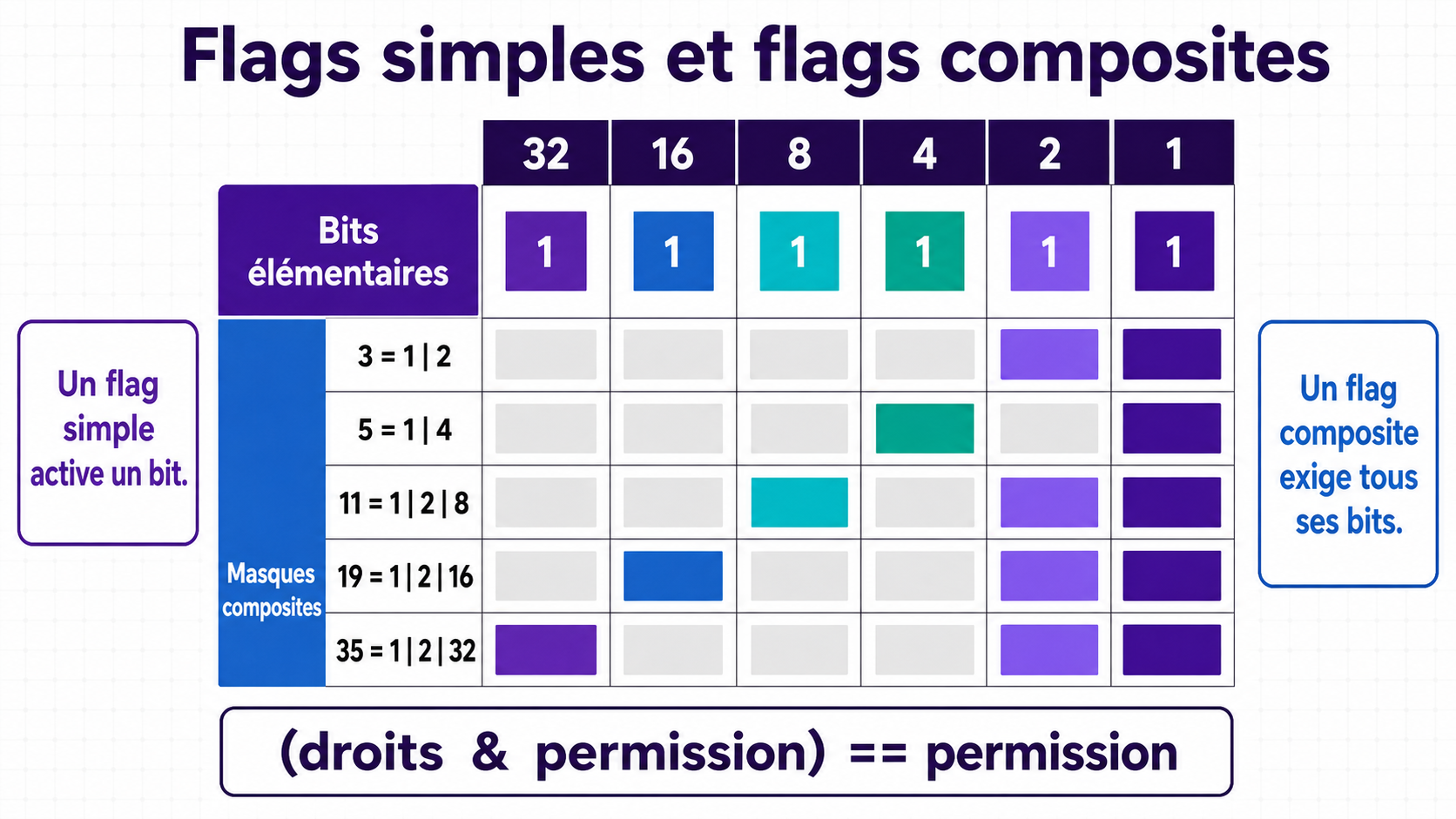
How to read this image
A binary number is written only with 0 and 1 :
0Means that the capacity of the column is disabled.1means that the capacity of the column is enabled.
Starting from the right, each column is worth twice as much as the previous one:
| Binary Position | 128 |
64 |
32 |
16 |
8 |
4 |
2 |
1 |
|---|---|---|---|---|---|---|---|---|
| Value when the bit is active | 128 |
64 |
32 |
16 |
8 |
4 |
2 |
1 |
To find out the decimal value, simply add up the columns containing 1.
Detailed example: why 35 is worth 100011
The number 35 Enables columns 32, 2 and 1 :
| Column Value | 128 |
64 |
32 |
16 |
8 |
4 |
2 |
1 |
|---|---|---|---|---|---|---|---|---|
Bit of 35 |
0 |
0 |
1 |
0 |
0 |
0 |
1 |
1 |
We therefore obtain:
35 = 32 + 2 + 1
35 = 00100011 en binaire
The same calculation can be presented as a simple assembly of flags with the operator | :
32  = 00100000
 2  = 00000010
 1  = 00000001
----------------  OU binaire
35  = 00100011
The operator | therefore keeps each active bit encountered. It does not concatenate numbers: it makes a mask containing all the selected capacities.
Reading the other lines
| Decimal | Decomposition | 8-bit binary write |
|---|---|---|
3 |
2 + 1 |
00000011 |
5 |
4 + 1 |
00000101 |
11 |
8 + 2 + 1 |
00001011 |
19 |
16 + 2 + 1 |
00010011 |
35 |
32 + 2 + 1 |
00100011 |
In the image, each colored box corresponds to a 1. A grey box corresponds to a 0. A composite permission requires that all of its colored boxes be also active in the user's permissions.
For example, testing permission 35 is the same as verifying that the rights contain the bits 32, 2 and 1 :
(droits & 35) == 35
If only one of these three bits is missing, the 35 is not granted.
Values 32, 2, and 1 correspond to three permissions, so 35 activates them all.
Some permissions, included as standard in Immersive, cover all the low-weight bits needed to target all permissions.
| Mask | Value | Common use |
|---|---|---|
0xF |
15 |
Workspace, Folder, and SupervisionScope. It covers the four low-weight bits. |
0xFFFFFF |
16777215 |
Map, WorldView, and Equipment. It covers the twenty-four low-weight bits. |
FullControl is not a special engine keyword. It is an ordinary permission whose mask contains the intended abilities for the type. If a future permission uses a bit outside the mask FullControl, it will not be automatically included.
5. AuthorizedFlags, DeniedFlags and priority of refusal
5.1 Content of a Right
A Right Associates a beneficiary with a target:
| Property | Meaning |
|---|---|
DomainSecurityObjectIdentifier |
User or beneficiary group. |
SecurizedObjectIdentifier |
The identifier of the protected instance. |
SecurizedObjectType |
The type of the protected instance. |
AuthorizedFlags |
Mask of granted abilities. |
DeniedFlags |
Hides explicitly denied abilities. |
Multiple permissions are grouped into a single right with the operator |.
right.AuthorizedFlags = existingAuthorizedFlags | permission.Flag;
right.DeniedFlags = existingDeniedFlags | deniedFlag;
An absent value is treated as 0.
5.2 Role of DeniedFlag
To test a rejection, the server uses:
int deniedFlag = permission.DeniedFlag ?? permission.Flag;
bool denied = (deniedFlags & deniedFlag) == deniedFlag;
On maps, composite permissions typically have a DeniedFlag elementary. For example, Modify Map Application Flag = 5, or the 1 + 4, but refuses with DeniedFlag = 4. The common read bit therefore does not need to be repeated in the deny mask.
5.3 Order of Decision
The central calculation follows the following order:
- Cerebrate is allowed without further calculation.
- The server resolves the target by its ID and type.
- It looks for a decline that applies directly to the user or one of their groups.
- If a rejection is found, the result is immediately refused.
- In the absence of a refusal, he seeks direct authorization or authorization inherited from a group.
- An active internal share can add permission, but never bypass an explicit deny.
- In the absence of authorisation explicit, the result is Denied by default.
A permission carried by one group does not compensate for a denial made by another group. If the user belongs to both groups, the denial wins.
The administration also prevents a permission that is simultaneously allowed and denied from being stored in the same mutation. Negative flags and unknown bits for the object type are rejected.
6. Direct rights, groups, automatic rights and sharing
6.1 Direct Law
The DomainSecurityObjectIdentifier of a Right can directly designate a user. The right then only benefits that user.
6.2 Group Entitlement
The DomainSecurityObjectIdentifier of a Right can also be a group. The security system traverses memberships recursively: a user who is a member of one group and is a member of another group inherits the rights of the parent group. Previously visited credentials are remembered to avoid an infinite loop in the presence of a group cycle.
6.3 Automatic Entitlement
An automatic rule of law does not constitute a second authorization mechanism. When an object is created or regularized, it resolves its beneficiary and then creates or completes a Right ordinary.
The variables currently provided for in the distinguished names are:
{CurrentUserDistinguishedName};{SubDomainName};{SubDomainDistinguishedName}.
An authorization rule adds the Flag of his permission to AuthorizedFlags. A deny rule adds its DeniedFlag, or its Flag failing that, DeniedFlags.
6.4 Internal Sharing
A share to an internal user or group can add the flags it carries to the central compute when it is active, not revoked, started, and not expired.
Sharing does not allow:
- to circumvent an explicit refusal;
- to administer in its turn the rights of the object;
- to introduce a mask that does not exist in the type's catalogue.
External sharing links do not participate in the authorization calculation of an authenticated user.
7. Basic Business Permissions Provided
This section describes the permissions persisted by installation migrations. The labels presented by an instance can then be changed in /Security/Configuration.
The C constants # GraphicStream.Immersive.Business.Security.Permissions provide convenient objects for controllers. However, the database remains the source of truth for the catalog loaded into the Domain. You should always select a permission with its object type and mask, not just its numeric ID.
7.1 Maps — Map, type 15
| Basic permission | Flag allowed | Refusal flag | Role |
|---|---|---|---|
Read Map |
1 / 0x1 |
1 |
Read the map properties. |
See Map |
3 / 0x3 |
2 / 0x2 |
See the contents of the map. |
Modify Map |
5 / 0x5 |
4 / 0x4 |
Edit the map properties. |
Edit Topography |
11 / 0xB |
8 / 0x8 |
Change the topography. |
Edit Points of interest |
19 / 0x13 |
16 / 0x10 |
Manage points of interest. |
Edit equipments |
35 / 0x23 |
32 / 0x20 |
Manage the equipment placed on the map. |
Edit All |
64 / 0x40 |
64 / 0x40 |
Globally manage the content associated with the map. |
Full control on map |
16777215 / 0xFFFFFF |
same mask | Full control over the capabilities in the first twenty-four bits. |
7.2 World Views — WorldView, type 25
| Basic permission | Flag allowed | Refusal flag | Role |
|---|---|---|---|
Read WorldView |
1 / 0x1 |
1 |
Read the properties of the world view. |
See WorldView |
3 / 0x3 |
2 / 0x2 |
See the contents of the world view. |
Modify WorldView |
5 / 0x5 |
4 / 0x4 |
Edit its properties. |
Edit WorldView |
11 / 0xB |
8 / 0x8 |
Edit the content associated with the world view. |
Full control on WorldView |
16777215 / 0xFFFFFF |
same mask | Total control. |
7.3 Equipment — Equipment, type 18
| Basic permission | Flag allowed | Refusal flag | Role |
|---|---|---|---|
Read Equipment |
1 / 0x1 |
1 |
Read the properties of the equipment. |
See Equipment instances |
3 / 0x3 |
2 / 0x2 |
View the instances of the equipment. |
Modify Equipment |
5 / 0x5 |
4 / 0x4 |
Edit equipment properties. |
Edit Equipment instances |
11 / 0xB |
8 / 0x8 |
Modify instances. |
ControlInstanceHandles |
19 / 0x13 |
16 / 0x10 |
Change the values of the instance handles. |
Full control on Equipment |
16777215 / 0xFFFFFF |
same mask | Total control. |
7.4 Workspaces — Workspace, type 37
| Basic permission | Flag allowed | Refusal flag | Role |
|---|---|---|---|
See Workspace |
1 / 0x1 |
same mask | Make the workspace visible. |
Read Workspace |
3 / 0x3 |
same mask | Read the workspace. |
Modify Workspace |
5 / 0x5 |
same mask | Edit the workspace. |
Execute Workspace |
11 / 0xB |
same mask | Run the workspace. |
Full control on Workspace |
15 / 0xF |
same mask | Full control of the workspace. |
7.5 Records — Folder, type 38
| Basic permission | Flag allowed | Refusal flag | Role |
|---|---|---|---|
See folder |
1 / 0x1 |
same mask | See the dossier. |
See folder content |
3 / 0x3 |
same mask | Consult its contents. |
Modify folder |
5 / 0x5 |
same mask | Change the folder name and properties. |
Modify folder content |
11 / 0xB |
same mask | Add or edit its content. |
Full control on folder |
15 / 0xF |
same mask | Read, edit, populate, and delete the folder. |
7.6 Supervisory Scopes — SupervisionScope, type 48
| Basic permission | Flag allowed | Refusal flag | Role |
|---|---|---|---|
See supervision scope |
1 / 0x1 |
same mask | See the scope of supervision. |
Read supervision scope |
3 / 0x3 |
same mask | Read its content. |
Modify supervision scope |
7 / 0x7 |
same mask | Change scope. |
Oversee supervision scope |
11 / 0xB |
same mask | Supervise the elements attached to the scope. |
Full control on supervision scope |
15 / 0xF |
same mask | Total control. |
7.7 OrganizationalUnit, type 12
| Permission | Flag | Role Described by the Seed |
|---|---|---|
Read |
1 |
Read properties and members. |
Modify |
3 |
Edit properties or metadata. |
Manage |
5 |
Add or remove members. |
FullControl |
16777215 / 0xFFFFFF |
Total control. |
8. Full Example of Calculation
Consider the map Identifier = 42, so the target (42, Map).
- The group
MapEditorshasAuthorizedFlags = 0x5: its members haveRead MapandModify Map. - The group
MapViewershasAuthorizedFlags = 0x3: its members haveRead MapandSee Map. - The group
RestrictedMapshasDeniedFlags = 0x4: its members are refusedModify Map, whoseDeniedFlagis worth4. - Alice belongs to all three groups.
Result:
| Permission tested | Result | Explanation |
|---|---|---|
Read Map |
Allowed | Groups MapEditors and MapViewers contain the required flag 1. |
See Map |
Allowed | MapViewers contains the authorized mask 3 and no refusals 2 does not apply. |
Modify Map |
Refused | MapEditors allows masks 5, but RestrictedMaps Refuses the bit 4. Refusal takes priority. |
Edit Topography |
Denied by default | No applicable duty contains the authorized mask 11. |
9. Rules to remember
- A
Permissiondescribes an action; aRightgrants or denies it on a target. - A
SecurizedObjectis identified by the type and identifier pair. - Flags can be combined with
|and test themselves with&. - A composite permission requires all bits of sound
Flag. DeniedFlagmay be different fromFlagto isolate the bit that is actually denied.- Any direct or inherited denial gains over permissions.
- Without applicable authorization, access is denied.
- Nested groups pass rights.
- Automatic duties produce
Rightordinary ones. - An internal share can add access, but never override a deny.
- The mask of an existing permission must not be changed after use.