Granting conditional rights
- Undefined type
This document is intended for security administrators, functional managers and integrators. It presents the principle of conditional rights, their evaluation, the management interface and the associated administration façade.
1. What is the purpose of a conditional right?
A conditional right grants permission to a group only when the user already has another permission on the same secure object.
In the security configuration, this behavior is represented by a ConditionalPermissionGrant, called Conditional duty in the interface. This object does not contain a list of devices: it describes a reusable rule by linking:
- A title and description that explain its business purpose.
- a beneficiary group;
- A secure object type.
- permission granted;
- a required permission, which must already be effective on the same object.
The rule carried by this object reads as follows:
SI l’utilisateur appartient au groupe bénéficiaire
ET s’il possède la permission requise sur l’objet X
ALORS il reçoit la permission accordée sur ce même objet X
Let's imagine the following case in Immersive: a user has to consult the maps of his perimeter and manage only the files of the devices that he is already authorized to see.
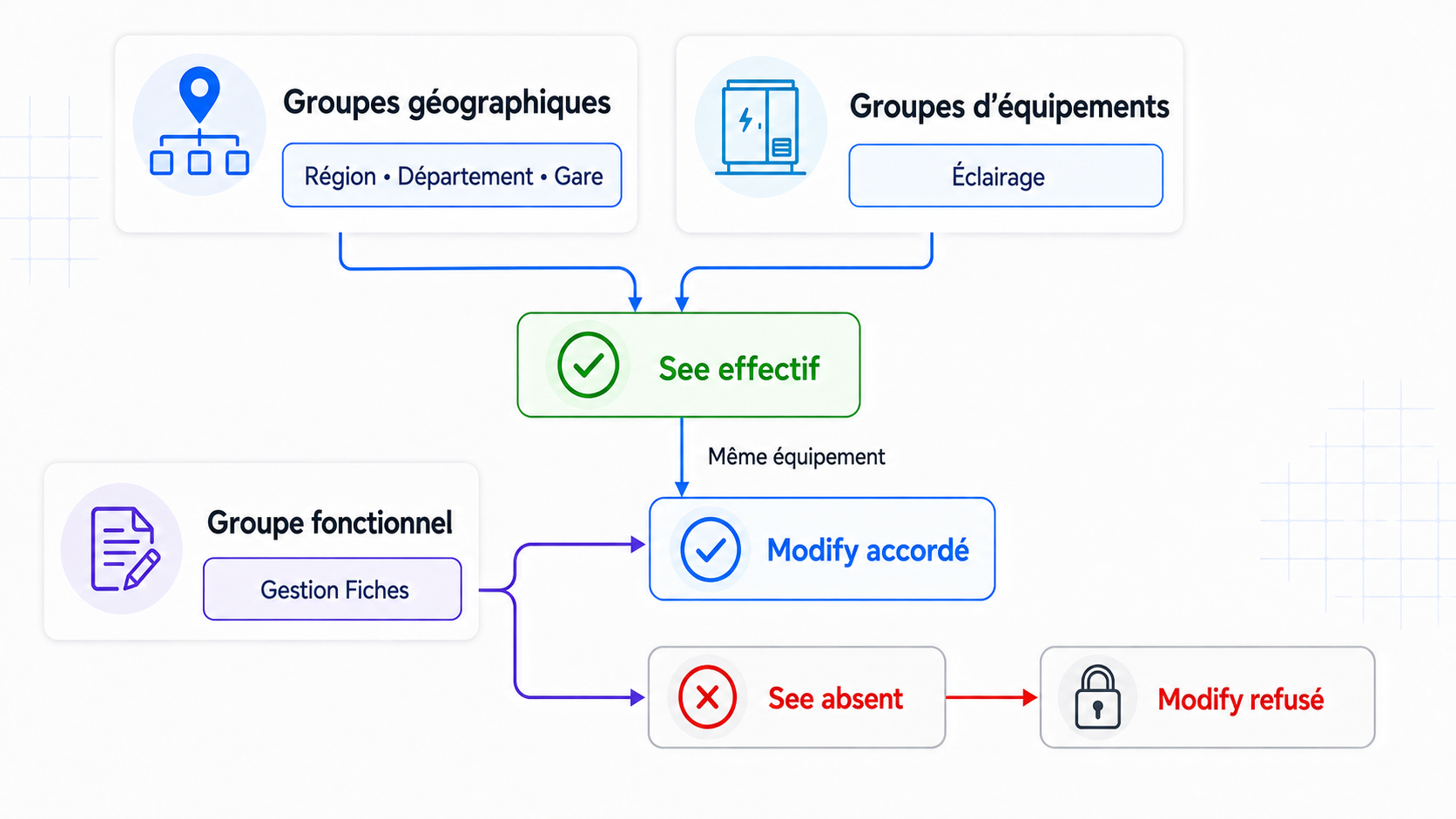
Its rights are based on three families of independent groups:
- the security profile Listing Management represents the functional ability to manage equipment records;
- The Geographic Groups, organised from the national level to the regions, departments and stations, determine the maps and places to which it can access;
- The Equipment Groups, as Lighting, CMV or Elevator, determine the families of equipment on which permission is granted
Seeis effective.
Two members of the Listing Management can therefore have different perimeters: one can see the lighting equipment of one region, while another can see the elevators of a single department.
The business question then becomes: How to give Cards Management members permission Modify without expanding their scope See ?
A first approach would be to grant directly Modify to the group Listing Management on all families of equipment. However, this right would be far too broad: all the file managers could modify all the families concerned, regardless of their own perimeter of visibility.
Modify and See are two separate permissions. In the current configuration ofEquipment, Modify includes the right Read, but does not automatically activate See. The problem with a direct right remains that it grants Modify without conditioning it on the law See of each user.
See the document Permissions and Rights of Secure Objects
It would be possible to grant the Modify to each user on each piece of equipment he sees. However, this solution would require considerable maintenance and each change in rights would become a potential source of errors.
This is where the Conditional duty. For the group Listing Management, the rule reads as follows:
- if the user belongs to the group Listing Management ;
- and if he already has
Seeon a piece of equipment; - so grant him
Modifyon the same equipment.
Listing Management can thus remain a purely functional group. Membership in this group does not, in itself, expand the visible equipment. It becomes a path of authorization towards Modify only where an applicable contingent right already exists See on the equipment tested.
We can then create the following conditional right:
| Element | Value |
|---|---|
| Title | Modifying the equipment visible to the listing managers |
| Description | Allows Listing Management members to edit only the devices on which See is already effective. |
| Beneficiary group | Gestion Fiches |
| Secure object type | Equipment |
| Permission granted | Modify |
| Permission required | See |
| Scope | The same equipment |
If See is effective on a piece of equipment — through direct or indirect membership in a group, or through direct permission — membership in Listing Management then makes it possible to obtain Modify on the same equipment. If See is not effective, Modify remains refused.
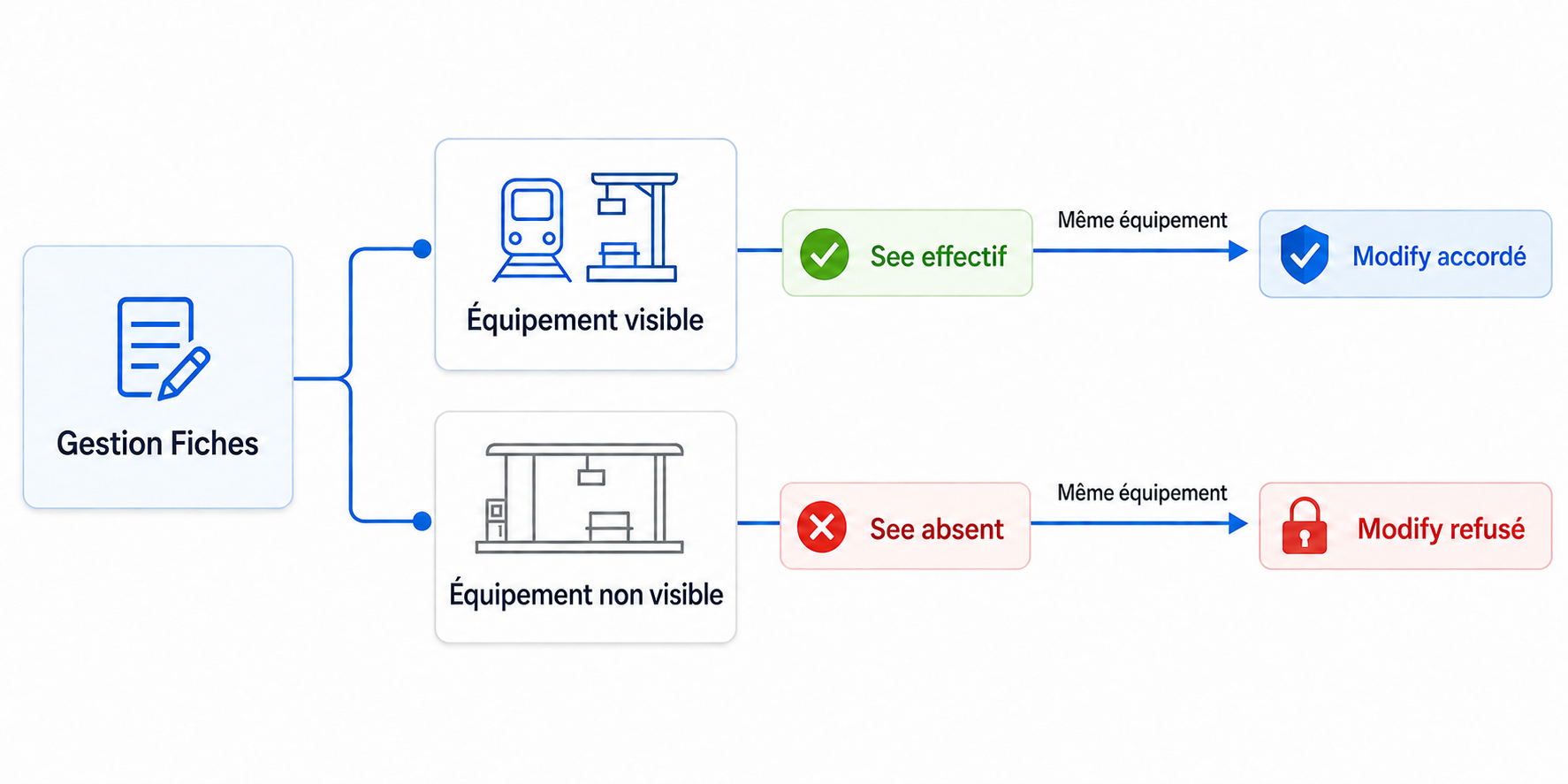
The conditional right does not create a permanent right for each object. It is evaluated at the time the application verifies a permission. It therefore applies to existing objects as well as to future objects, without regularization.
2. How is the visibility perimeter maintained?
The conditional right does not directly refer to a region, a department, a station or a particular family of equipment. For each piece of equipment tested, safety first determines whether the permission See is effective for the user.
In this example, this See results from the crossing of two dimensions:
- The Geographic Groups determine where the user can access the equipment;
- The Equipment Groups determine which families of equipment are visible to him.
These groups are not registered in the contingency tax. They contribute upstream to the calculation of See. The conditional rule then checks only two things on the affected device:
- Is the user in the functional group Listing Management ?
- already has
Seeon this same equipment?
Let's take Alice's example:
- Alice is a member of the group Listing Management ;
- its geographical hierarchy gives it access to a region;
- Its equipment groups allow it to see the lighting equipment in that region.
With the ruler Gestion Fiches : Modify si See, the result varies for each piece of equipment:
| Equipment tested | Geographical scope | Visible family | See |
Modify |
|---|---|---|---|---|
| Lighting in his region | Allowed | Yes | Workforce | Granted |
| Elevator in his region | Allowed | No | Absent | Refused |
| Lighting outside your region | Outside the scope | Yes | Absent | Refused |
In all three cases, Alice still belongs to Listing Management. It is the presence or absence of See on the equipment under test that determines whether Modify is granted. Another member of the Listing Management can therefore obtain a different result depending on its own geographical groups and its own families of visible equipment.
3. How is a permission evaluated?
For a regular user, the assessment follows this order:
- seek an explicit refusal of the requested permission;
- if a denial applies, deny access;
- otherwise, seek direct authorization;
- if no direct authorization applies, review the active conditional rights;
- allow if at least one applicable rule meets its condition;
- otherwise, deny access.
For a conditional rule to apply, all of the following conditions must be met:
- the rule is active;
- The type of the object matches the type configured in the rule.
- the permission requested corresponds to the permission granted;
- The user belongs to the beneficiary group, either directly or through nested groups.
- The required permission is effective on the same object.
An explicit refusal always takes precedence. A refusal of Modify prevents authorization even if the condition See is satisfied. A refusal to See also prevents a rule that requires See to be triggered.
Multiple rules can grant the same permission. They work as alternatives: all that is needed is for an enforceable rule to succeed. A rule can express only one required permission.
Dependencies can be chained. For example, a permission can depend on Modify, which itself depends on See. Cycles such as Modify si See and See si Modify are prohibited.
4. Scope of the Rules
A rule is defined for a Secure object type, but its condition is assessed on a Precise purpose of this type.
If the user has See on equipment 125, the rule may grant it Modify on the equipment 125. The fact of possessing See on equipment 126 grants nothing on equipment 125.
The current version only supports the scope same purpose :
- The permission granted and the required permission belong to the same secure type.
- they are evaluated with the same object identifier;
- A permission possessed on a station, department, or other equipment does not satisfy the condition in place of the object being tested.
5. Conceptual Data Model
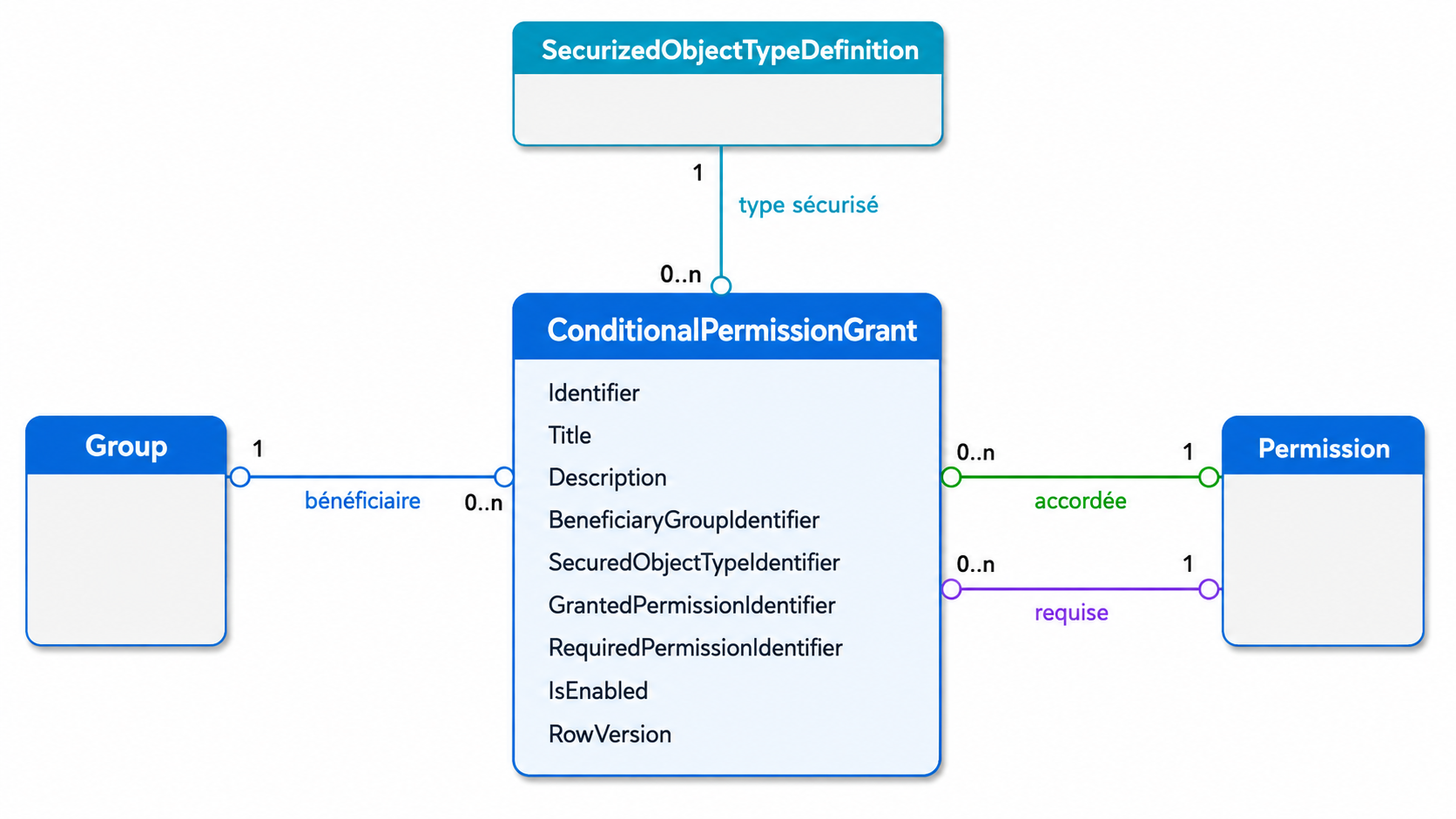
ConditionalPermissionGrant is the object that represents a conditional law. Each occurrence answers the following question:
For the members of which group, on what type of object, what permission should be granted if what other permission is already in effect on the same object?
The rule does not contain a user ID or device ID. It describes a reusable relationship between security objects; the result is then calculated for the user and object at the time of access control.
5.1 Related Objects and Cardinalities
Each conditional right is related to exactly:
- a
Group, which designates the beneficiary group; - a
SecurizedObjectTypeDefinition, which designates the type of object concerned; - a
Permissionin the role granted ; - a
Permissionin the role required.
Conversely, each of these objects can be used by zero, one, or more conditional rights.
| Security object | Role in the conditional right | Cardinality for a rule |
|---|---|---|
Group |
Group whose members can benefit from the rule. | Exactly one |
SecurizedObjectTypeDefinition |
The type of objects on which the rule is evaluated. | Exactly one |
Permission — Role granted |
Permission obtained when condition is met. | Exactly one |
Permission — role required |
Permission that must already be in effect on the same object. | Exactly one |
Permissions granted and required are not two different permission categories. They are two relationships to the same security object Permission, each with a specific role in the rule.
5.2 Data carried by the rule
| Data | Meaning |
|---|---|
Identifier |
Unique technical identifier of the conditional right. |
Title |
A mandatory title, limited to 255 characters, that summarizes the business intent. |
Description |
An optional explanation, limited to 2,048 characters, that provides useful context for administrators. |
BeneficiaryGroupIdentifier |
Reference of the beneficiary group. The user's direct or indirect membership in this group is verified during the evaluation. |
SecuredObjectTypeIdentifier |
Reference of the type of secure object, for example Equipment. |
GrantedPermissionIdentifier |
Reference of the permission that the rule can produce, for example Modify. |
RequiredPermissionIdentifier |
Reference to the permission that must already be in effect on the same object, for example See. |
IsEnabled |
Active or inactive state. Only active rules participate in the evaluation. |
RowVersion |
The version used to detect a concurrent change and prevent an administrator from silently overwriting a newer action. |
The title and description are only used to identify and explain the rule in the administration interface. They do not participate in the calculation of the entitlement. IsEnabled, however, determines whether the rule can be used.
5.3 Integrity Rules
The configuration protects the following rules:
- The group, the secure type, and both permissions are required and must exist.
- The secure type must be active when creating a rule.
- The permissions granted and required must be different and both belong to the selected type.
- The same combination Group + Type + Permission Granted + Permission Required Can only be saved once, even if the existing rule is inactive.
- The creation or reactivation of a rule is denied if it introduces a cycle of dependencies between permissions.
- Deleting a group, type, or permission that is still referenced by a rule is blocked.
- When a state change or deletion occurs, the known version of the rule can detect a concurrent change.
Thus, a single rule Gestion Fiches : Modify si See can be applied to all present and future equipment. However, it does not produce Modify than for equipment on which See is actually obtained by the user.
6. Management interface
The page is accessible from Security, then Conditional Rights. Access has also existed since Configuring rights with the action Administering conditional rights.
In the current interface, this page is for the account only Cerebrate.
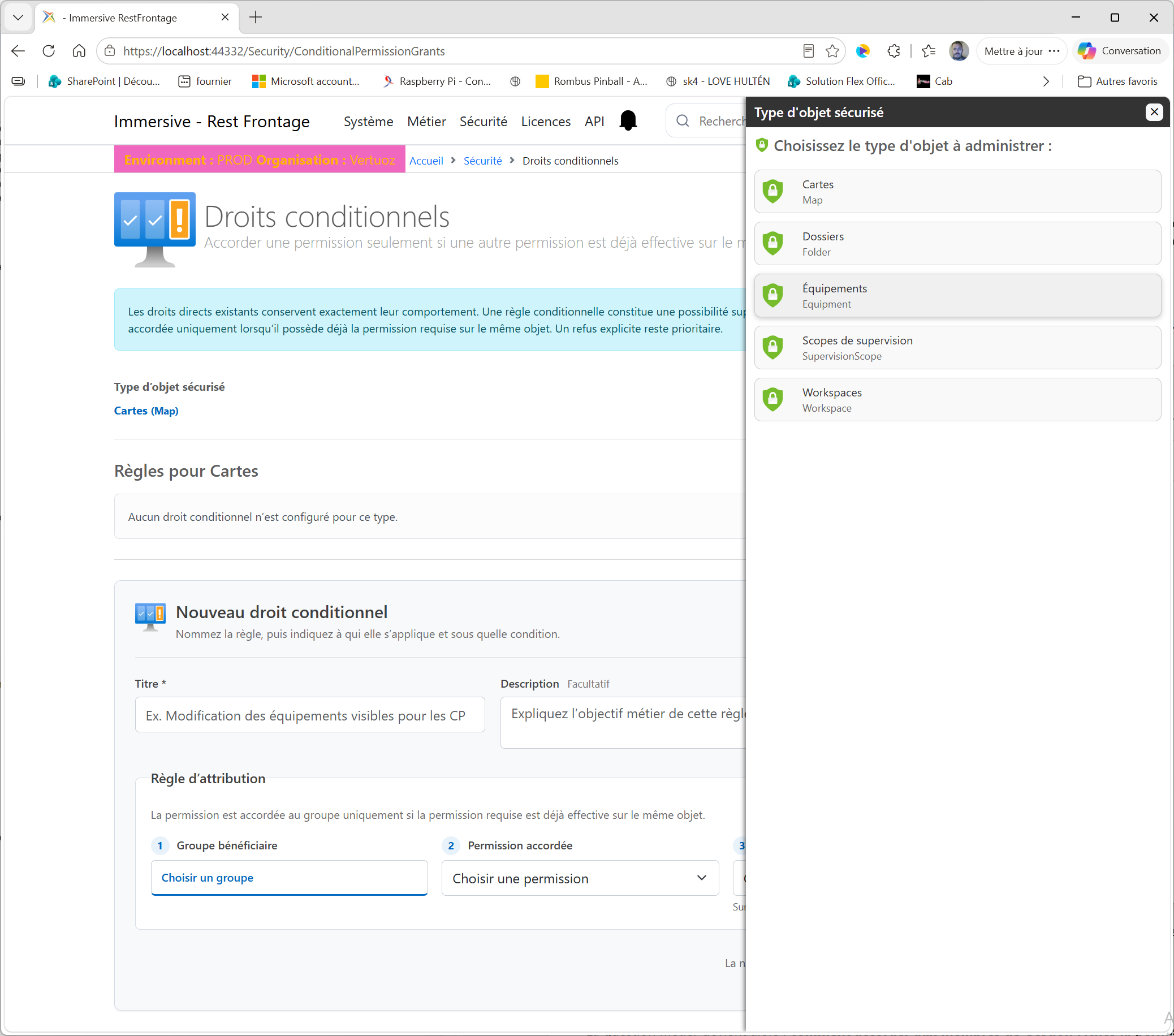
6.1 Choosing the Object Type
The Secure Object type is presented as a clickable link.
- click on the type displayed;
- Choose a type in the selection window.
- the window closes automatically;
- The page reloads the rules of the chosen type.
The window only offers the types configured in security.
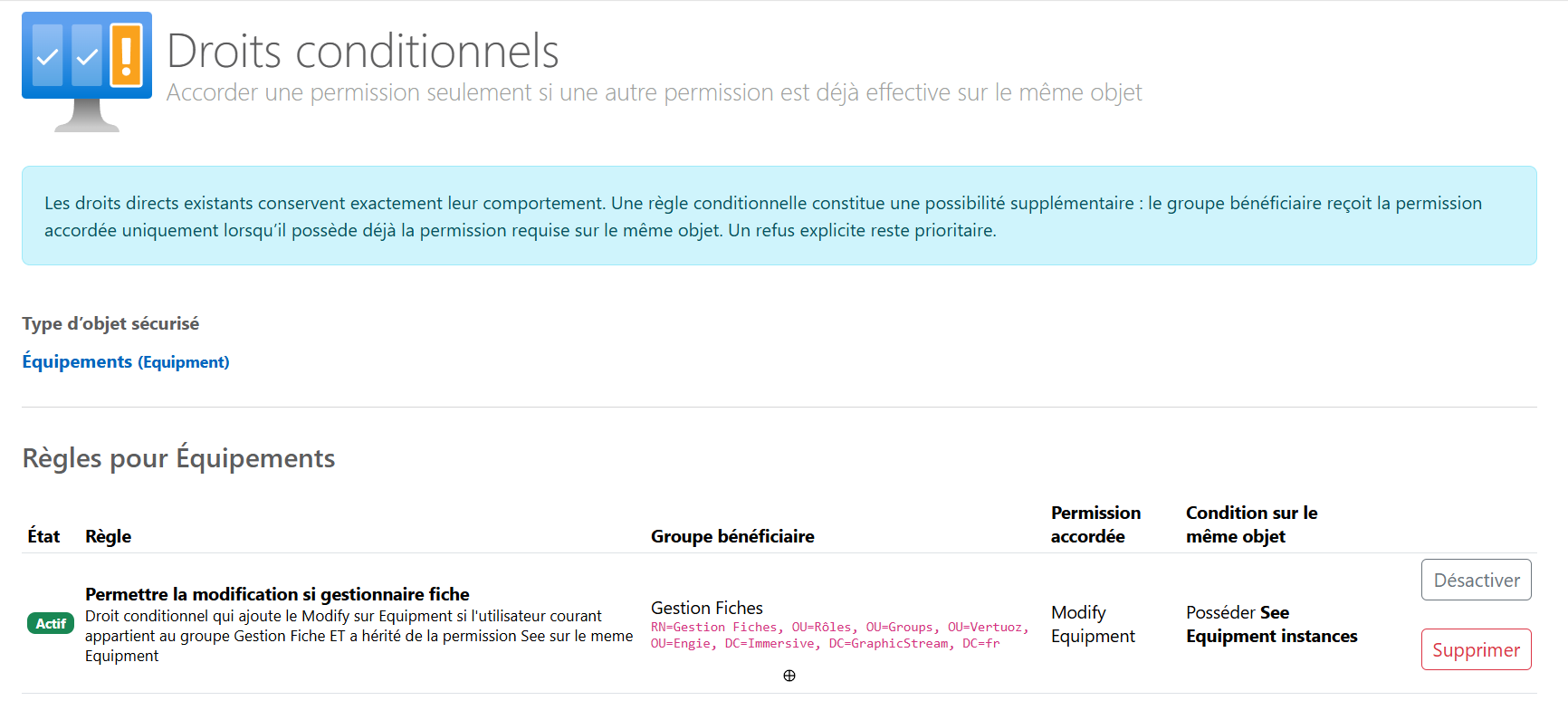
6.2 Reading the existing rules
For the selected type, the table displays:
| Column | Contents |
|---|---|
| Status | Actif or Inactif. |
| Beneficiary group | The name of the group and, when available, its Distinguished Name. |
| Permission granted | Permission produced by the rule. |
| Condition on the same object | Permission that the user must already have. |
| Actions | Enable, disable, or delete the rule. |
Active rules are displayed before inactive rules.
6.3 Adding a Rule
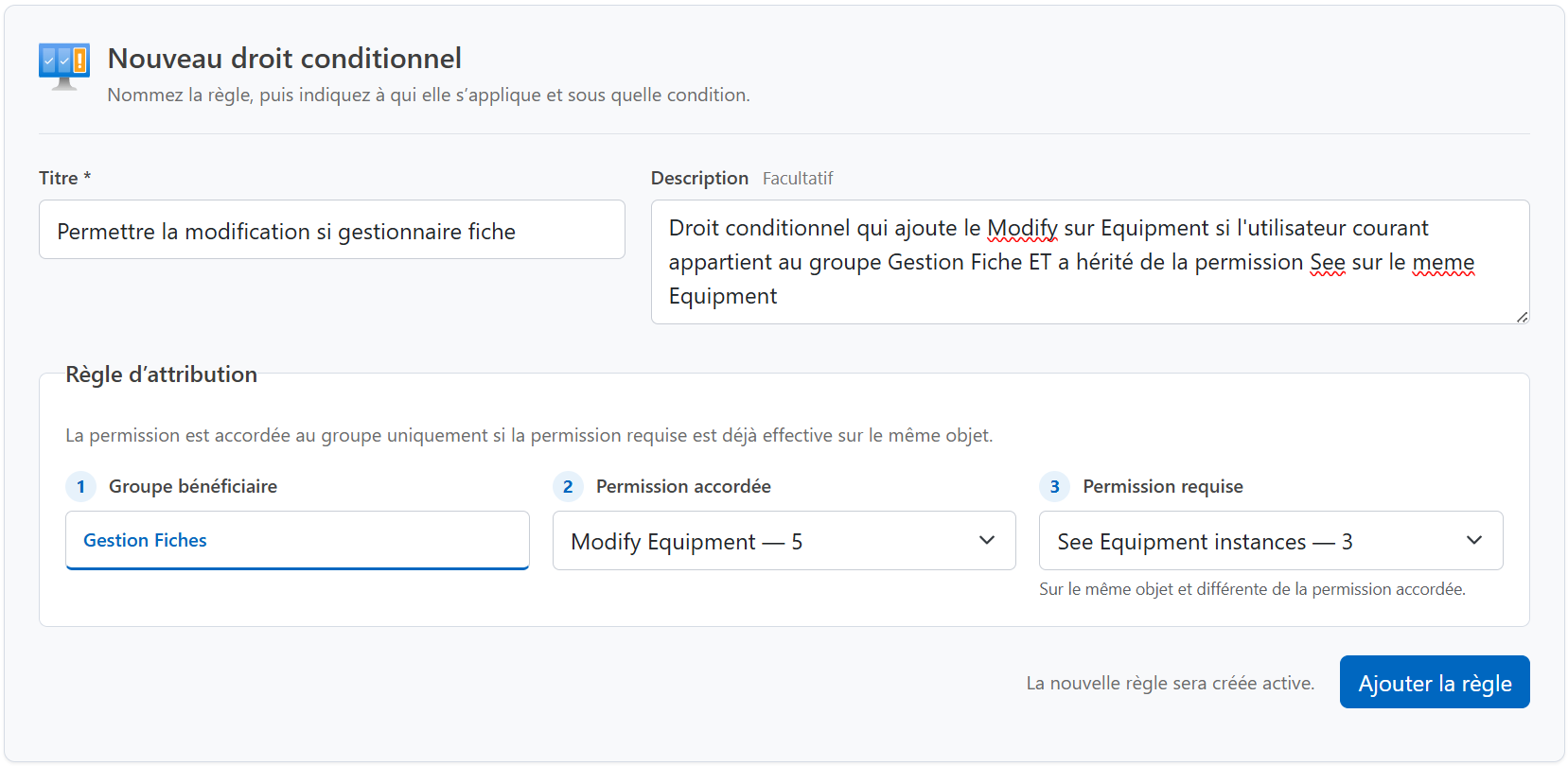
How do I add a rule?
- Select the type of secure object.
- in New conditional right, click on Choose a group ;
- Select the beneficiary group in the window that shows only the groups.
- choose the permission granted;
- choose a different required permission;
- click on Add to cart ;
- Check the confirmation message and the new active line.
The add button becomes available after choosing the group, as long as the type is active and has at least two permissions.
6.4 Disable, Reactivate, or Delete
Disable Immediately removes the conditional contribution without clearing the definition. This action is suitable for a test or temporary suspension.
Activate Returns the rule to service after a new check of dependency cycles.
Delete Deletes the definition after confirmation. To restore it, it must be recreated.
Disabling or deleting a rule doesn't change existing direct rights. It only removes the authorization path provided by that rule.
If another administrator has changed the rule between the time it was displayed and the requested action, the registration is denied. The page must then be reloaded before starting again.
7. Admin façade and security API
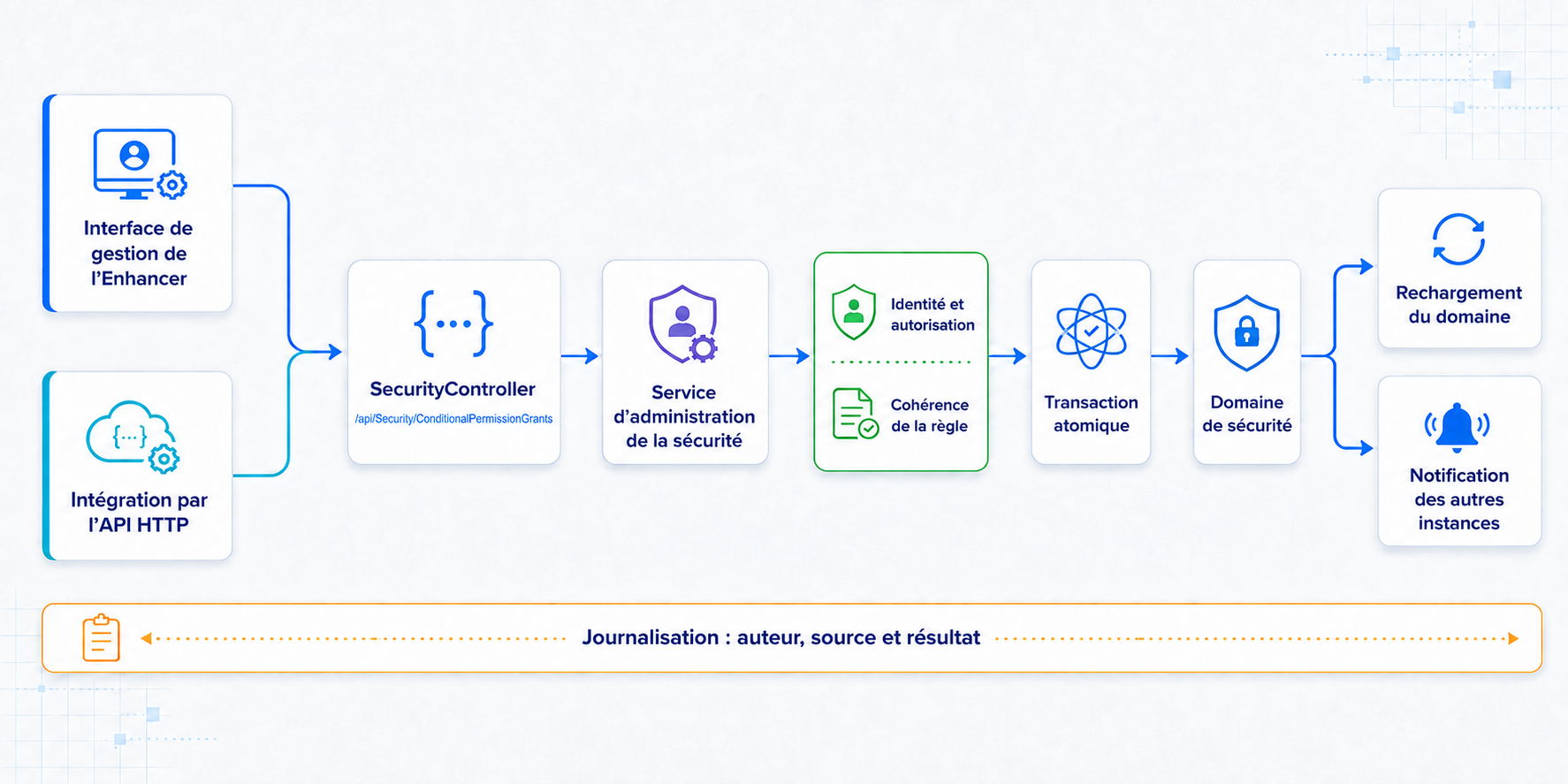
The Enhancer's management interface never directly modifies the security data. Its actions go through a common administration façade that forms the boundary between the interface and the security domain.
The same business orders are now available to integrations via the HTTP Web API of SecurityController. Whether an order comes from the Enhancer or the API, it is transmitted to the same façade and therefore benefits from the same validations.
7.1 Available Management Orders
| Operation | Route HTTP | Expected information | Result |
|---|---|---|---|
| Consult | GET /api/Security/ConditionalPermissionGrants |
Optional filter securedObjectTypeIdentifier. |
A list of all matching rules, active or inactive, with their IDs and versions. |
| Create | POST /api/Security/ConditionalPermissionGrants |
Title, optional description, group, secure type, permission granted, and permission required. | Create an active rule and return its version. |
| Change the state | PATCH /api/Security/ConditionalPermissionGrants/{identifier}/Enabled |
The new state and known version of the rule. | Activating or deactivating and returning the new version. |
| Delete | DELETE /api/Security/ConditionalPermissionGrants/{identifier} |
Known version of the rule. | Deleting the rule. |
The RowVersion is represented in Base64 in JSON exchanges. After a new or changed state, the caller must keep the new value returned for their next operation on the rule.
There is no order to modify an existing definition globally. To change the group, type, or one of the permissions, you must create the new rule, validate it, and then deactivate or delete the old one.
7.2 Facade Controls
The façade systematically applies the following protections:
- the author is determined from the authenticated context;
- Only Cerebrate and the platform root administrators can change this configuration.
- the group and type must exist;
- The type must be active at the time of creation.
- Both permissions must exist, be distinct, and belong to the chosen type.
- duplicates and cycles are refused;
- each change is recorded in an atomic transaction;
- A version that has become obsolete leads to a response
409 Conflictrather than overwriting a more recent change; - After validation, the security domain is reloaded and the change is reported to other instances.
- The source of the operation and the author are written to the server logs.
The existence of HTTP routes does not bypass security controls: they require authentication, and the façade then verifies that the author is authorized to administer that configuration. An external integration should never write directly to the table ConditionalPermissionGrant.
8. Effect of Changes
| Change | Expected effect |
|---|---|
| Creating a Rule | The rule becomes active for existing and future objects as soon as the security domain is refreshed. |
| Adding a user to the beneficiary group | The user can benefit from the rule according to their required permissions. |
| Withdrawal from the beneficiary group | The user no longer benefits from the rule by this path of membership. |
| Adding or removing the required permission on an object | Conditional permission appears or disappears for the same object. |
| Deactivation | The definition remains visible but no longer participates in decisions. |
| Reactivation | The rule participates again in decisions after validation. |
| Deletion | The rule disappears; direct rights remain unchanged. |
9. Current Limits
The current mechanism does not allow:
- Choose an individual user as the beneficiary.
- Require multiple permissions simultaneously in a single rule.
- Use permission from another object as a condition.
- link two different types of objects in the same rule;
- to ignore an explicit refusal;
- create a cyclical dependency;
- directly expose management through a dedicated public API web route.
To express two mandatory conditions, for example See and Approve, the model must be changed. Two separate rules would currently mean See or Approve.
10. Troubleshooting
| Symptom | Audits |
|---|---|
| A CP member sees the equipment but cannot edit it | Verify that the rule is active, that its type and permissions are correct, that the user belongs to CP, and that there are no rejections Modify does not apply. |
| A CP member can modify too much equipment | Search for a direct right Modify too broad, and then check the origin of his rights See. |
| The expected group does not appear in the selection | Verify that the object exists as a group in the security domain and reload the page. |
| The Add button remains unavailable | Check the choice of group, the active status of the type, and the presence of at least two permissions. |
| The addition is refused | Verify that the permissions are distinct, that they belong to the chosen type, that the rule does not already exist, and that it does not create a cycle. |
| An action is denied after an old view | Reload page: Another change likely changed the rule version. |
| Deactivation seems to have no effect | Check whether a direct right or other conditional rule still grants permission. |
11. Commissioning Checklist
- The relevant secure type is active.
- Granted and required permissions belong to this type.
- The recipient group corresponds to the expected functional profile.
- The required permission correctly represents the scope to be retained.
- The rule does not duplicate an existing rule.
- No cycle of dependencies is introduced.
- Direct rights that are too broad have been identified.
- Explicit refusals were checked.
- Nested groups were checked.
- The rights tester confirms the result on a visible object and a non-visible object.
- The rule has been validated with a real CP or Master Records user.