Manage automatic entitlements
- Undefined type
This document describes how to create, test, enable, disable, and delete rules that automatically assign rights when creating secure objects.
1. Principle
An automatic rule of law combines four pieces of information:
| Information | Role |
|---|---|
| Item Type | The family of objects on which the rule will be applied. |
| Permission | Action to allow or deny. |
| Effect | Autoriser or Refuser. |
| Recipient Expression | DistinguishedName fixed or calculated from variables. |
An active rule is used when creating an object by the pathways connected to the auto-entitlement pipeline. The auditing tool uses the same rules to determine the expected permissions on existing objects.
A rule is not a right that has already been applied. It is a template used to produce a Right on each object concerned.
2. Open automatic rights management
- Open
/Security/Configurationwith the Cerebrate account. - Identify the type concerned.
- Click on Automatic fees.
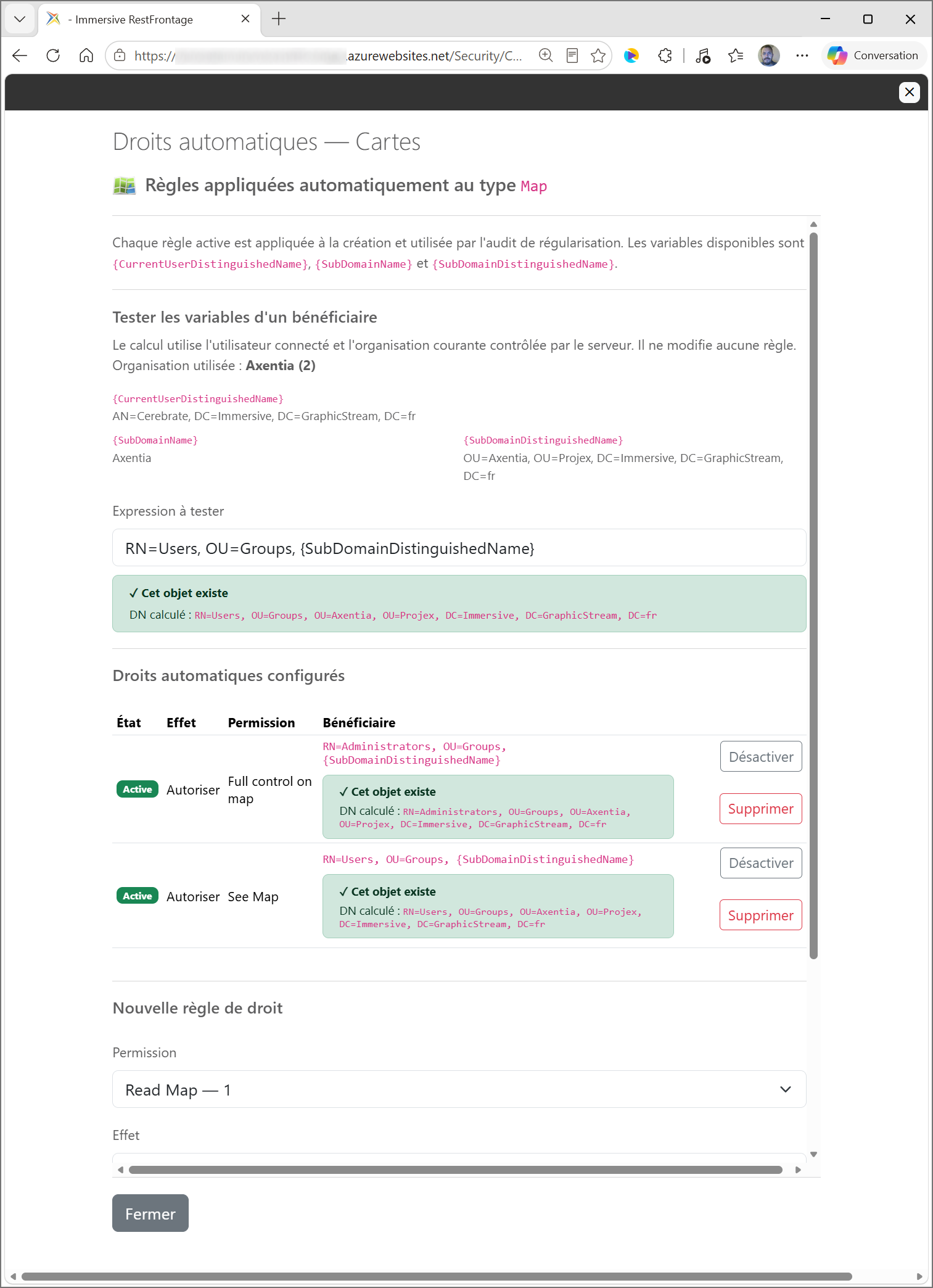
The window contains:
- the tester of the beneficiary variables;
- the list of existing rules;
- The form for creating a rule.
:::
3. Choose the effect
The effect determines the mask inscribed in the right produced:
| Effect | Mask used |
|---|---|
Autoriser |
The Flag permission is added to AuthorizedFlags. |
Refuser |
The DeniedFlag is added to DeniedFlags. If the permission does not define one, its Flag is used. |
Example with Modify Map, whose Flag is worth 5 and the DeniedFlag is worth 4 :
- a rule Allow Product
AuthorizedFlags = 5; - a rule Refuse Product
DeniedFlags = 4.
The refusal is therefore produced only if the effect Refuse has been chosen. When calculating access, an applicable denial takes precedence over permissions.
4. Build the Beneficiary
The expression must produce a DistinguishedName valid. It can be fixed or contain the following variables:
| Variable | Value Used |
|---|---|
{CurrentUserDistinguishedName} |
The distinguishedName of the user that causes the model to be applied; in the tester, the logged-in user. |
{SubDomainName} |
The short name of the security subdomain of the current organization. |
{SubDomainDistinguishedName} |
DistinguishedName is the full name of the subdomain of the current organization. |
Example:
RN=Users, OU=Groups, {SubDomainDistinguishedName}
For an organization whose subdomain is OU=Paris, DC=example, DC=local, the result becomes, for example:
RN=Users, OU=Groups, OU=Paris, DC=example, DC=local
Variable names are recognized regardless of case. Any unknown variables are rejected during registration.
5. Testing an expression
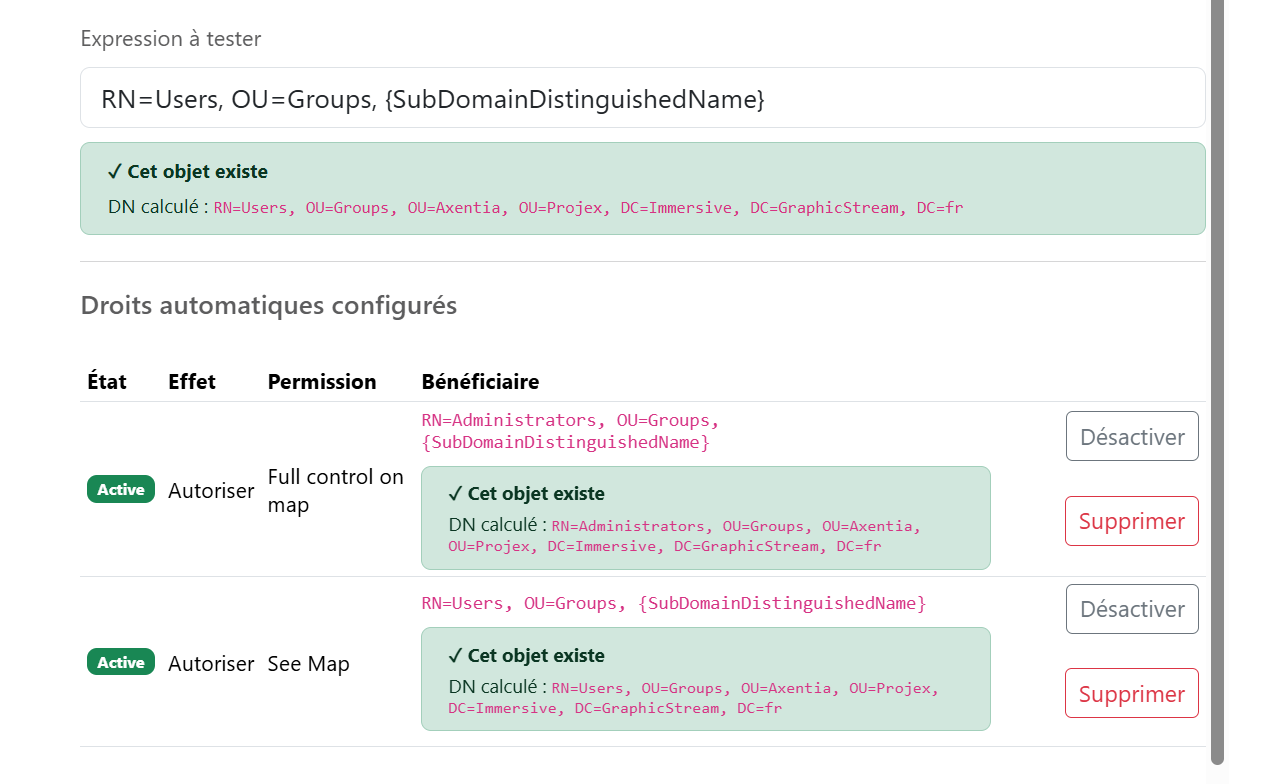
The tester uses the logged-in user and the current organization controlled by the server. It displays:
- the organization actually used;
- the value of the three available variables;
- The calculated DistinguishedName;
- A green status if the beneficiary exists.
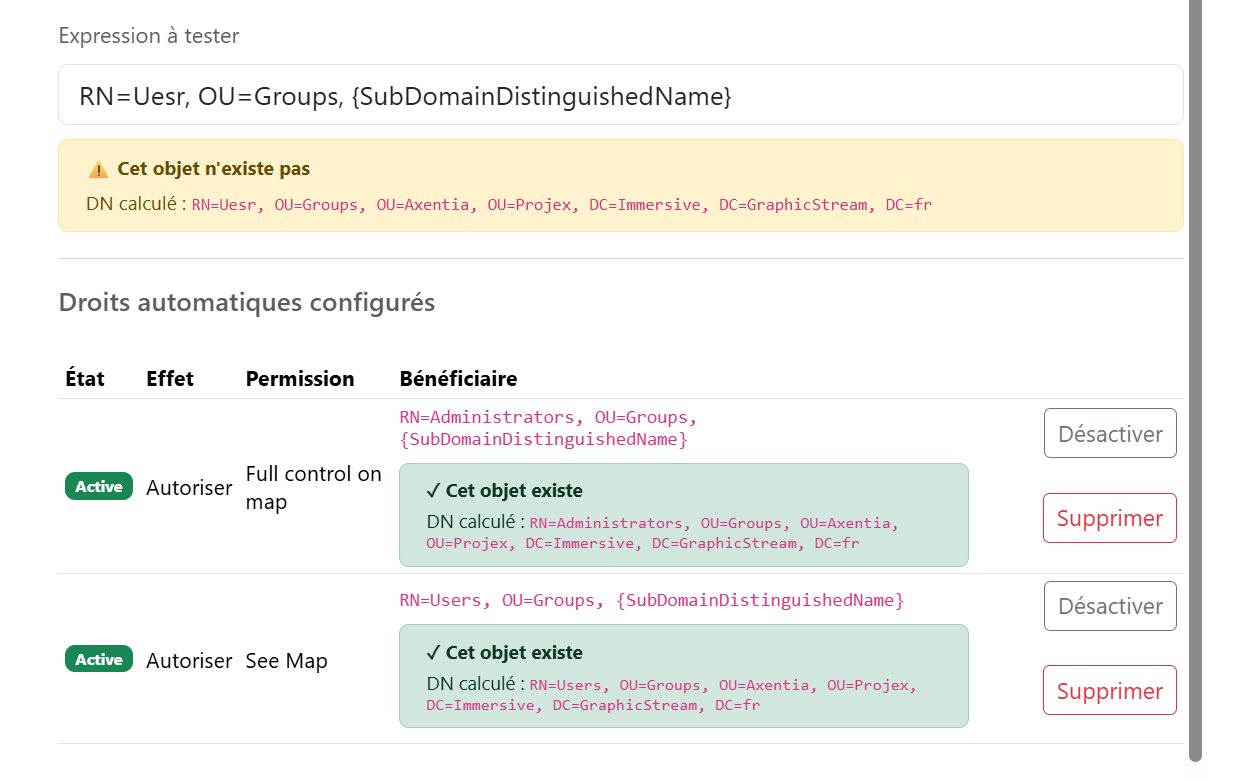
- A warning if the DN is valid but does not match any security object.
- an error if the DN or a variable is invalid.
Entering into the tester does not change any rules.
An organization must be selected and match an active security subdomain to test organization variables.
6. Create a rule
The type must be active and have at least one permission.
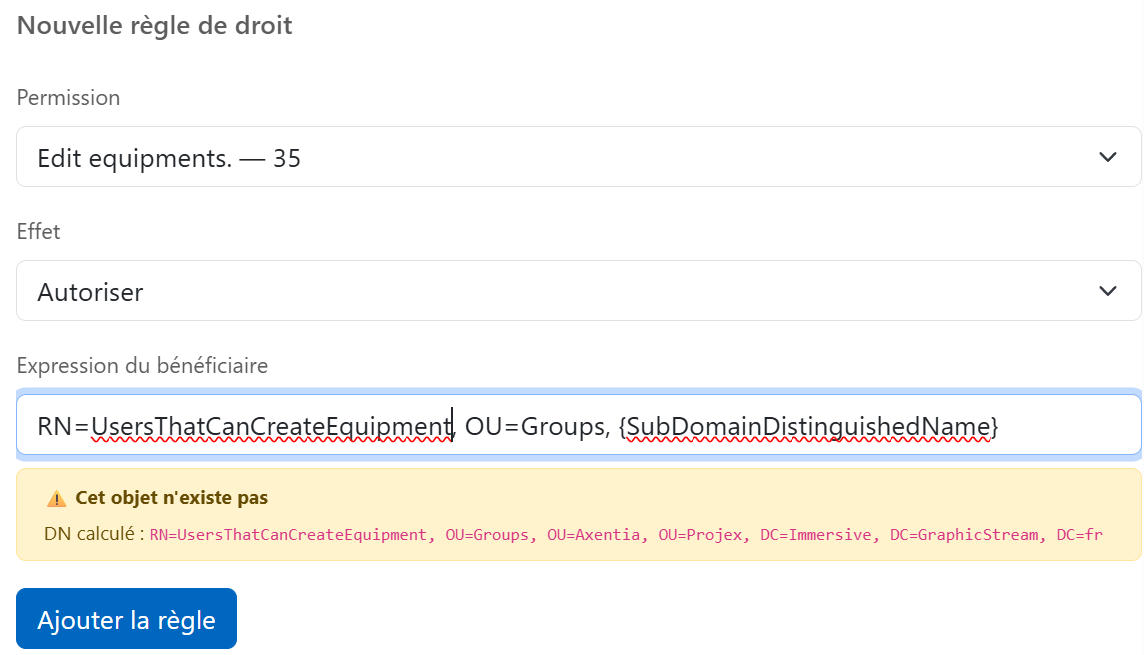
- Select permission.
- Choose the effect Allow or Refuse.
- Enter the recipient's expression.
- Check the DN calculated under the field.
- Click on Add the rule.
The new rule is active as soon as it is created.
The server refuses:
- a permission belonging to another type;
- an unknown effect;
- An empty expression or greater than 2,048 characters.
- An invalid DistinguishedName.
- An unsupported variable.
- A duplicate with the same type, permission, effect, and expression.
7. Read the list of rules
Each row displays:
| Column | Meaning |
|---|---|
| Status | Active or inactive rule. |
| Effect | Authorization or refusal produced by the rule. |
| Permission | Permission of which the mask will be used. |
| Beneficiary | Saved expression and DN calculated in the current organization. |
| Actions | Activation, deactivation or deletion. |
The number displayed in the main list of /Security/Configuration Counts all saved rules, including inactive rules.
8. Disable or delete a rule
Disable Keeps the rule as a base but excludes it from the model loaded into memory. It can be reactivated later.
Delete definitively withdraws the rule after confirmation.
In both cases, the Right Already produced on existing objects are not automatically removed. The change relates to future applications of the configuration and the expected outcome of the audit.
Disabling the type from the main list does not disable its rules one at a time. To stop using a rule, use the Disable of this rule.
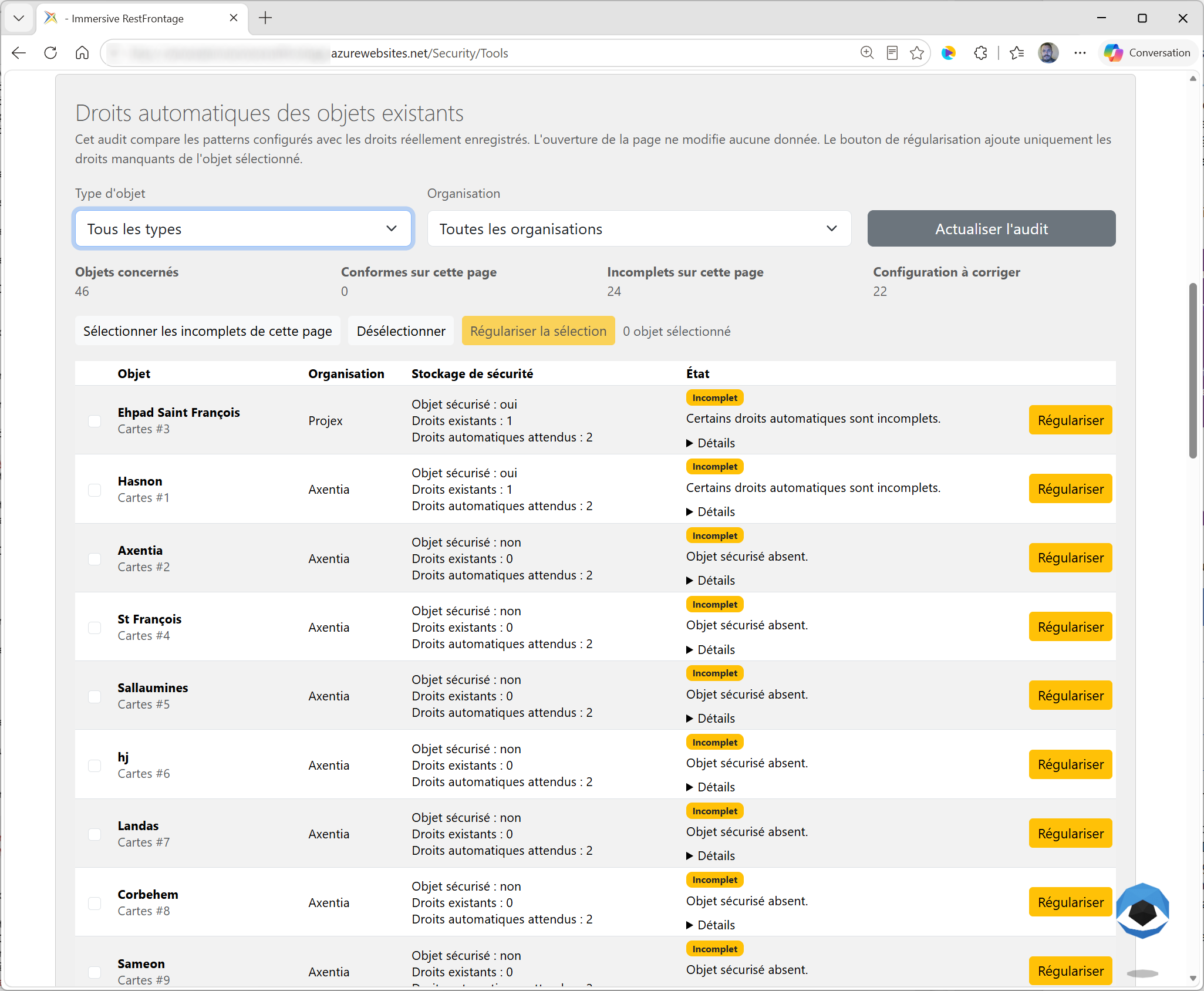
9. Apply the rules to existing objects
Creating or modifying a rule does not immediately rewrite all objects that are already present.
To check the existing system:
- Open
/Security/Tools; - Access automatic rights auditing.
- filter by type and, if necessary, by organization;
- Review the states Sold out, Incomplete or Incorrect configuration ;
- Use Regularize on incomplete objects.
Regularization adds the expected automatic rights. It should not be interpreted as a general cleanup of the additional rights already present.
10. Full Example
Goal: To give users in the organization the right to view newly created maps.
| Parameter | Example value |
|---|---|
| Type | Map |
| Permission | See Map |
| Effect | Autoriser |
| Beneficiary | RN=Users, OU=Groups, {SubDomainDistinguishedName} |
When applying the rule:
- The server resolves the subdomain of the map organization.
- it constructs the DistinguishedName of the group
Users; - he finds this group in the field of security;
- it creates or supplements the
Rightof the group on the map; - he adds the
FlagofSee MapàAuthorizedFlags.
If the beneficiary does not exist, no entitlement can be produced and the audit reports a configuration problem.
11. Rules to remember
- An active rule produces rights; it is not itself a right.
- Allow uses the
Flagof permission. - Refuse uses its
DeniedFlag, or itsFlagfailing that. - The tester uses the current organization without changing the configuration.
- A beneficiary must resolve to an existing security object to produce a right.
- A new rule is not retroactive to all existing objects.
- The audit and regularization are used to deal with the existing situation.
- Disabling or deleting a rule does not automatically remove the rights that have already been produced.